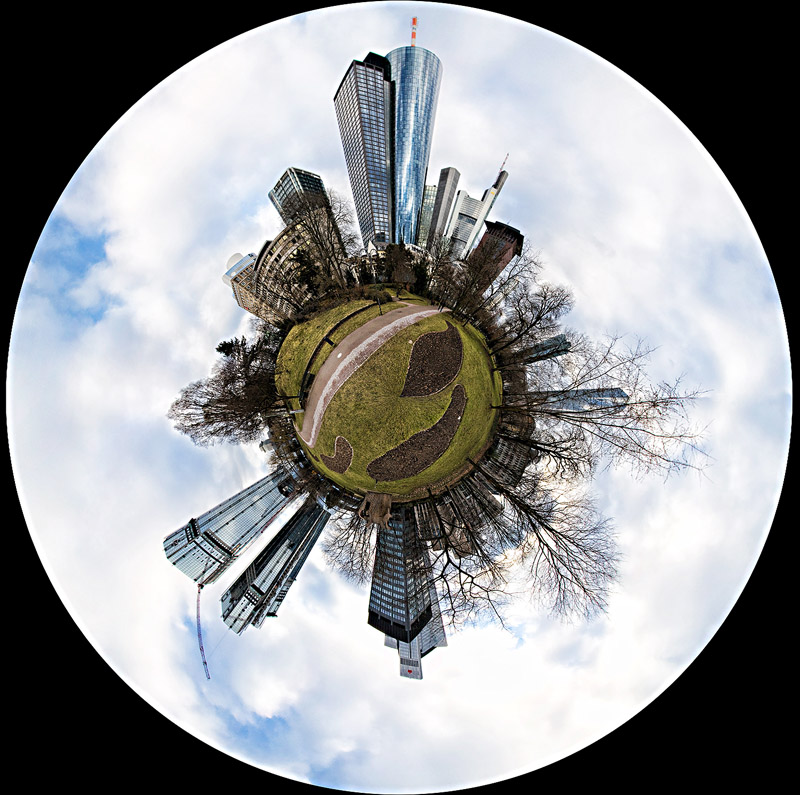
A little park amidst Frankfurt's skyscrapers. Always wanted to try one of these! The pano was shot with the 10-22.
Got some help from both Mephisto (how to shoot for this, and how to use "photomerge" which I didn't know about) and Timfythetoo (turn upside down to get the ground in the middle, duplicate to be able to use "transform"). The basics are as follows:
Shoot in a complete circle with a bit of overlap in each frame. In other words, go stand in the middle of somewhere, and turn 360 degrees, shooting as you go. I did this one with my wide angle lens and 12 shots in portrait orientation. I checked the exposure in a couple of directions (nice kinda low light) and set the exposure manually to keep it the same for all the shots.
Combine all the shots into a panorama - I used Photoshop for this. In Bridge, highlight/select all the shots you want to use (but don't "open" them), go to Tools, Photoshop, photomerge. I selected the auto option (first one) and it seems to do a pretty good job of it. Crop your pano carefully so that the right and left sides will meet without overlap once you make a circle.
At this point, I highly suggest resizing the image - it'll be a huge file. Then turn it upside down, duplicate the layer, extend the canvas to make a square, and apply Filter, distort, polar coordinates. Then select Edit, Free transform, and turn it into a circle. I think there's a better way to do this last part neatly but at least it will get you started.
This is just amazing, Deb. I tried polar coordinates once to do something similar and it didn't even come close. If you rotate it just a bit it looks like a strange smiley face.
Oh DEB! This is AWESOME! Did you have to use a special lens? Or was it done with photoshop mastery. You NAILED it either way. I love how the park looks like a face with a wicked crooked grin :)






 Add photograph to your favorites
 Add photographer to your favorites

 Photographer found comment helpful.


