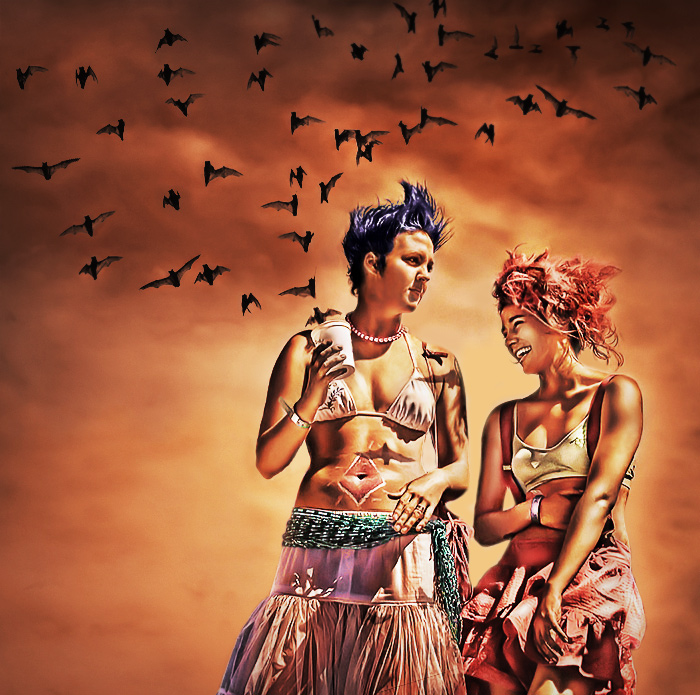
Just having some fun. Btw, those are real bats just taken from another photo of mine.
Editing Steps:
1. Raw conversion - used default values.
2. Tone mapping - applied to duplicated layer.
3. Duplicated original layer - applied above tone mapping layer using lighten blending. This brought back the highlights that the tone mapping dimmed.
4. Flatten layers
5. Shadow/highlights - applied to duplicate layer.
6. Bat photo import - copied bats from another photo of mine with background masked out. Duplicated some of them to cast shadows on main subjects.
7. Neatimage - applied to duplicate flatten layer.
8. Burning - used to darken shadows that were brightened too much as the result of previous steps. Used an opacity of 7% with multiply blending selected.
9. Cloning - used to remove part of a person on the left edge and remove other imperfections.
10. Curves - used to darken overall image with main subjects masked out.
11. Lucis Arts Sculpture Filter - applied to duplicate flatten layer. Results increase overall contrast.
12. Dodging - used to brighten shadows on main subjects.
13. Noise Reduction filter - PS version applied to reduce overall noise.
14. Gradient map (light brown to black) - used in color blending mode to give it a brownish color and lower overall contrast.
15. Brightness/Contrast - used to bring up contrast back up (+4 brightness/ +19 contrast) while masking out highlights that were clipping previously.
16. Duplicate original layer - used to add some original color back to the main subjects. Applied at 30% opacity with lighten blending.
17. Curves - used to tweak tones (all channels).
18. Shadow/highlights - applied to even out tones some more.
19. Smart sharpen - applied to whole image.
20. Color Balance - used to give the image a more reddish/yellowish look.
21. Unsharp mask - applied to duplicate flatten layer to provide more local contrast (amount 22, radius 80, threshold 1).
22. Logo - added barcardi logo at bottom
23. Flatten layers and saved for web.
Original
Alternative version (doesn't use Lucis Arts filter)
GENIUS! WOW... I flipped back and forth between the original and the final product and was transfixed with your expertise and talent. Reminded me of kiwiness (if you don't mind the comparison). Stunning - and inspirational - work. I can't wait to see what you come up with next!!!
Love the ''bat shadows"! Were these models or did you just happen upon this colorful pair? I love everything about the original and the photoshopped one.
Hey, so is that guano in her cup? Did you take this on a planet with two suns? Are they leaning against a large blue reptile? Can you pour me a Batcardi and coke? Batty, man. But cute ;-)
ha! this a popular photo right now. Honestly I'm not loving the processing, but the bats...oh the bats, and the idea, are enough to get my vote... plus the reality of the clothes and the hair....
honestly, i'd like to see some other versions of this shot.
really amazing. you really need to make a tutorial on this processing or just send me a pm. i have seen a few from before where you were heading towards this and you haev blown those others away.




 Add photograph to your favorites
 Add photographer to your favorites


 Photographer found comment helpful.


