Hey Betsy, here is a tutorial on how to use Save For Web in PS for challenge submissions. It will allow you to get both file size and image size up to the max limits. I hope this helps :).
Your score is a reflection of your image size here. This would probably end up low-5s otherwise, but voters are going to hammer unreasonably small images, every time. If you aren't sure how to resize images to take full advantage of the rules, PM me or search the forums.
Better luck next time!
01/29/2007 02:47:10 PM
I did try to size it 640x640 but the file size was still too large (500kb) --so after much debate, I submitted this b/c it was 148kb. With the size restriction at 150kb, how do you get a large, detailed photograph? I used "Size for web" in PS Elements..
this format never does well! Always take advantage of the 640pixel rule!
01/29/2007 02:47:10 PM
thank you SO much for this information... I did try to size it 640x640 but the file size was still too large (500kb) --so after much debate, I submitted this b/c it was 148kb. With the size restriction at 150kb, how do you get a large, detailed photograph? any help would be appreciated...
Sorry but this is too small to be judged effectively. You are allowed to submit an image up to 720 px for any dimension. You've been given a large canvas to use and you just painted in the corner. Bad analogy maybe but you get the idea.
01/29/2007 02:47:10 PM
I did try to size it 640x640 but the file size was still too large (500kb) --so after much debate, I submitted this b/c it was 148kb. With the size restriction at 150kb, how do you get a large, detailed photograph? any help would be appreciated!! thank you!
Too small to score! Next time put up a 640x640 shot :) 4
thank you SO much for this information... I did try to size it 640x640 but the file size was still too large (500kb) --so after much debate, I submitted this b/c it was 148kb. With the size restriction at 150kb, how do you get a large, detailed photograph?
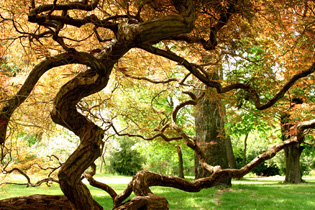
Lovely tree, would like to see it better. Looks like the base got cut out too. Here is a tutorial for proper sizing for DPC:
//www.dpchallenge.com/tutorial.php?TUTORIAL_ID=26
thank you SO much for this information... I did try to size it 640x640 but the file size was still too large (500kb) --so after much debate, I submitted this b/c it was 148kb. With the size restriction at 150kb, how do you get a large, detailed photograph?
i imagine this image has potential, and i imagine you do, as well. however, i think you owe it to yourself to check out the tutorials related to preparing images and sizing them for these challenges...
You have what looks like it could be a good shot here, but the photo itself is too small to see the detail that would make it great. Try to use the maximum size allowed for your entries.
I wish you would use full size for you image. This has some lovely lines and nice colors, but it is only a little larger than a thumbnail on my monitor. It is impossible to judge the quality of the image.
Sorry but this is too small to be judged effectively. You are allowed to submit an image up to 720 px for any dimension. You've been given a large canvas to use and you just painted in the corner. Bad analogy maybe but you get the idea.
Lovely tree, would like to see it better. Looks like the base got cut out too. Here is a tutorial for proper sizing for DPC:
//www.dpchallenge.com/tutorial.php?TUTORIAL_ID=26
Nice idea, but imho photo is too small and the tree trunk in the background interferes with the forms of the maple branches in the foreground. Maybe if you moved a bit to the right that tree trunk would disappear, or if you opened the f-stop up wide you could have blurred it out of existence.
Lovely color and intriguing lines with an interesting subject. Unfortunately, its presented too small to see detail and accuracy of focus. Check one of the tutorials in the "learn" section or ask for help in resizing in a forum.
why so small? you're definitely hurting your score by not using the extra size allowance given in this challenge ... it's hard to see any details in your photo ...
This one would definitely have benefitted from using the full 720 pixel width that we are allowed in this challenge. Also darkening the whole background would make the colors look richer.
Your score is a reflection of your image size here. This would probably end up low-5s otherwise, but voters are going to hammer unreasonably small images, every time. If you aren't sure how to resize images to take full advantage of the rules, PM me or search the forums.
Lovely composition, but I think the tiny size of this image seriously weakens it. I'm giving it a 5, but if I could see more detail, I might very well have rated it far higher.
Ah.. great shot, too bad it is so small, I know the vote scores will reflect that. The trouble is, this small it is too hard to see what resolution you actually have. Still.. nice shot. Hope after the challenge you can post a bigger version of it.






 Add photograph to your favorites
 Add photographer to your favorites

 Photographer found comment helpful.


