i'd processed this image below for our may creative side challenge, but wasnt happy with it.
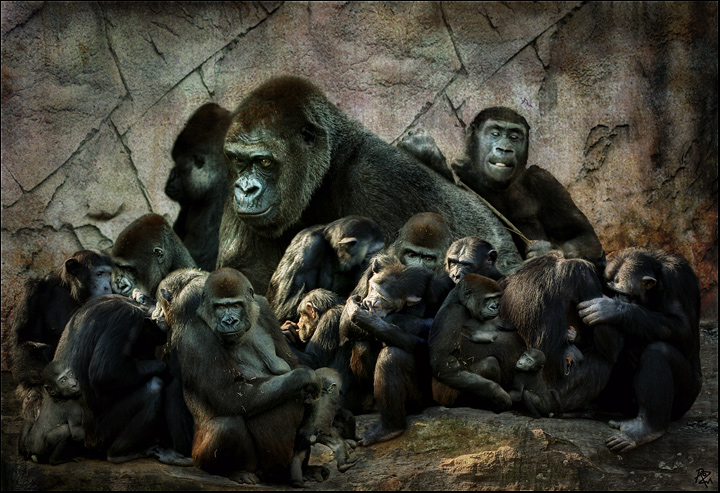
i brought another very similar photograph into photoshop to try something else .. then i brought in another photograph and another photograph and another photograph . i think i used 6 photographs, all from saturday at the zoo to create this image ..
i used this texture but changed its colouring before bringing it in .. vintage background also used this texture by erin ErinM..
there are chimpanzees and gorillas together in this image, altho they were in different enclosures in real life ... also i've made their sizes a bit odd .. it is supposed to be a bit mad after all !!..:)..
sorry to anyone who is offended by the title .. i've been told that the gorillas are not monkeys but apes .. but a title gorilla and chimpanzee madness was too cumbersome .. !!..:)
Suggestion; Now that you are friends of the zoo, why not take in a CD of all your zoo images, as they may buy them from you for advertising, or maybe zoo postcards.
It would be worth you while I think as you have some amazing zoo images.....
Echo that!! This is really fantastic and would look great on the zoo brochure or poster!
This IS in insane, Roz! If I ever come visit, I won't get so see any Australia. Instead I'll be sitting at the computer with you, sucking your brain dry. (how do you like that image!)
Love it - really excellent job in clarity and blending - I like the different sizes, too. Makes it sort of like a painting.
Another great animal image from you and so so good with the processing skills you have done of this fine image.....
Suggestion; Now that you are friends of the zoo, why not take in a CD of all your zoo images, as they may buy them from you for advertising, or maybe zoo postcards.
It would be worth you while I think as you have some amazing zoo images.....
Masterful! Truly masterful. I love the light the most. BTW your tutorial was very helpful, Roz. Thanks. Now, would you please send the advanced one on blending and layer masking. There must be some shortcuts I'm unaware of. All that masking is soooooo tedious. I can spend hours masking out intricate details at maximum zoom. Are there some tricks I am unaware of?






 Add photograph to your favorites
 Add photographer to your favorites


 Photographer found comment helpful.


