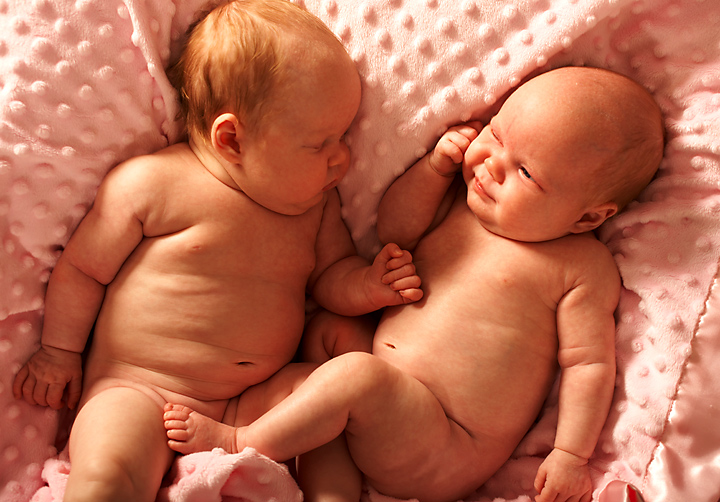
Twins, obviously not identical, but equally as cute! Having a really hard time getting these images to look as good on the web, as they do on the computer. I use the tutorial in learning to prepare images for the web, but still seem to have problems. If anyone would like to give me suggestions t would be very grateful. Some of the images here look so go@@#DAMN crisp and it pissses me off, because I can't seem to get the same results. I am using a MacBook Pro, and that might have something to do with it. Seems like I have to oversaturate to get a decent looking image for the web.
Statistics
Place: 56 out of 131 Avg (all users): 5.5476 Avg (commenters): 6.1429 Avg (participants): 5.4211 Avg (non-participants): 5.6126 Views since voting: 1052 Views during voting: 384 Votes: 168 Comments: 14 Favorites: 1 (view)
This is a very cute moment and should make a great keepsake. There's a litle too much of a yellowish-orange tone for my taste. But I see that little peek there. Good luck!
Very cute picture. I think that there is just too much pink. Or perhaps the lighting is wrong. Whatever it is, the skin looks orange to me. I've looked at this on several computers, with several different monitors and at different resolutions and I still see orange in the skin.
Having five children of my own I'm a sucker for shots like this. My only suggestion that you may want to try in the future is to use a darker color blanket. The pink blanket seems to be catching shadows that are a tad distracting. Another option might be to bring in another light from a different angle to knock some of the shadows down. I hope you do well in the challenge.






 Add photograph to your favorites
 Add photographer to your favorites


