It's a shame there have been many comments about the size of your model. It can't be nice for her to read comments like that :-( I for one think she's quite curvy and attractive.
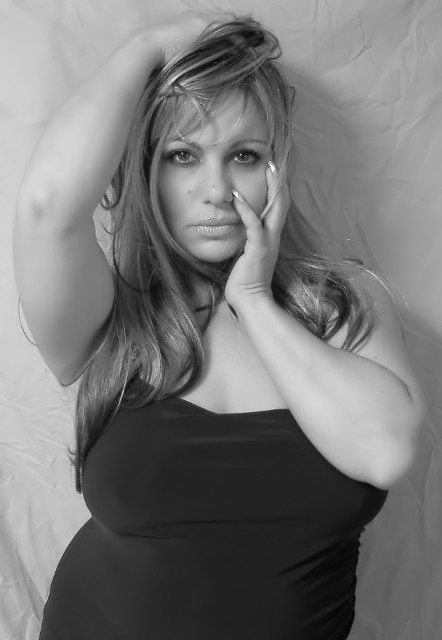
You have done some things very well here. She looks comfortable in her pose and her make up and hair is absolutely fabulous. I like the natural light, but for this pose, it lights "too much." I think some sidelighting, or even backlighting might help it to be more dramatic. If you want to keep the natural light, i would suggest a closer crop so that just her face is showing.
Several people commented on her size, and I am wondering if the pose you have her in actually makes her look larger than she is. Straight on, unless you are toothpick sized, will always make you look larger if I am not mistaken. Perhaps if she were turned slightly and looking back at you it would be more flattering.
You met the challenge. The shot is bw, and it is okay. I think a bit more contrast would help to add interest. To me, it seems as if there is a dark gray ranging to a lighter gray, but no distinct blacks and whites, and this gives the shot a "flat" feeling.
The background -- that one item probably dropped your potential score more than anything. A wrinkled background appears hurried and sloppy. Either iron it, or take the wrinkles out in post processing.
Overall, pretty well done.
If I need to further clarify anything, please let me know.
Perhaps a good photo of this person but I do not find her appealing because of her size. A more attractive model would have worked better for this challenge, in my humble opinion.
Nice b&W treatment and smooth skin. The lighting looks nice on the model but I feel the backround distracts me with the wrinkles. I also feel that lighting the background with a light would have given more contrast to the pretty subject in front.
You've got pretty good light here, and good skin tones in the conversion. I'm not sure about the pose, though it is attention grabbing. She has very seductive eyes. :-) The backdrop wrinkles can be "smoothed" in post processing for advanced editing, either by selecting the background and applying gaussian blur, or using the blur tool in Photoshop. It will give a more finished appearance to the shot, in my opinion.





 Add photograph to your favorites
 Add photographer to your favorites

 Photographer found comment helpful.


