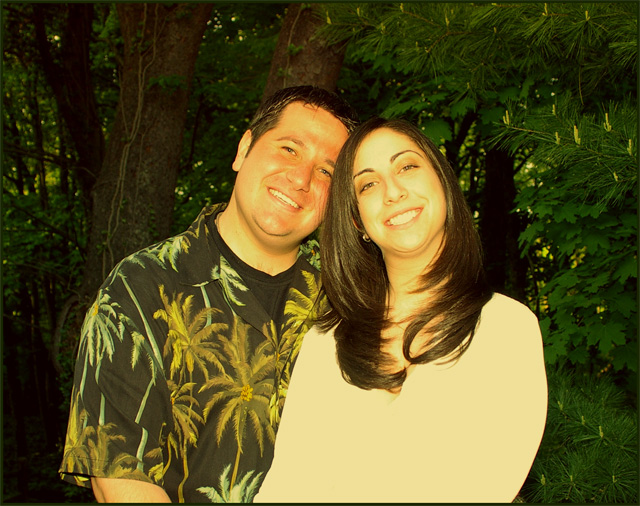
My brother and his fiance in my first portait attempt. Editing details are Levels, Colors, Saturation, and the standard resizing. Photo was taken with a Sunset filter to compensate for the flash. 35mm focal length.
Statistics
Place: 210 out of 211 Avg (all users): 3.8333 Avg (commenters): 3.6207 Avg (participants): 3.6330 Avg (non-participants): 4.1169 Views since voting: 1584 Views during voting: 319 Votes: 186 Comments: 34 Favorites: 0
When I am looking at the score you got for this and look at the picture that is just not right to me. you should have been a litle higher then that.
The yellow color you have on the picture is probably from your filter. Sunset filter? Try to avoid most filters when shooting digital. UV and Polarizer should be the only filters Photoshop can't do better then.
Then I see you used saturation? I think that could have been a problem aswell when working this picture, becouse you actually got it a litle wrong.
I like the pose though and maybe a tighter crop could have helped, but I am not sure.
Seems overexposed to me. Couple too bright compared to the background. Lighting not creative... a snapshot.
Try changing your angle so you are not shooting up at them. They both have double chins.
I like their expressions..pleasant and relaxed. There are some technical issues with this image, however, including color cast and blown out highlights...
Color needs to be corrected. also the white of the girls shirt is way overexposed. Adjustments may have been okay in the red range. Congratulations on the engagement. Nice couple.
Your dsaturation is a little yellow/green and the contrast is high, causing some detail to be bown out. This is a nice pose and seemingly well though out. Just needs a little more post-processing
A nice enough pose, but the skin tones need some serious work, I'm afraid. Everything is way too yellowish and contrasty. Probably a little too much headroom there, too.
Great smiles here. Next time try having the lens at shoulder height of subject rather than lower on the body - this will help with the head tilt. Exposure/white balance is off - there is a severe loss of detail on the girl's shirt and an orange cast to the skin tone. Also, watch the background to avoid the "tree growing out of the head" effect - or use a shallower DOF to overcome it.
Erm. That's an extremely strong yellow colour cast. I'm sure you've had other comments about it... The portrait itself is sweet, the expressions are natural. Lighting is a touch harsh and highlights slightly sweaty or oily faces. Colour cast could have been resolved by changing white balance settings on shooting, or correction in conversion if shooting in RAW, or in post processing if shooting in JPEG.
This photo looks very yellow/green on my monitor. You may want to go back and color balance. Cute couple and nice pose, the print on his shirt is a little distracting.
The color cast is disturbing to me on this shot, and the way her shirt doesn't seem to have any detail, as if it were overexposed. Nice looking couple, though.
Nice looking couple, good capture. It is to bad it looks to have a significant yellow/green color cast. That could be taken care of in post processing. The female model's blouse/shirt is overexposed.







 Add photograph to your favorites
 Add photographer to your favorites


