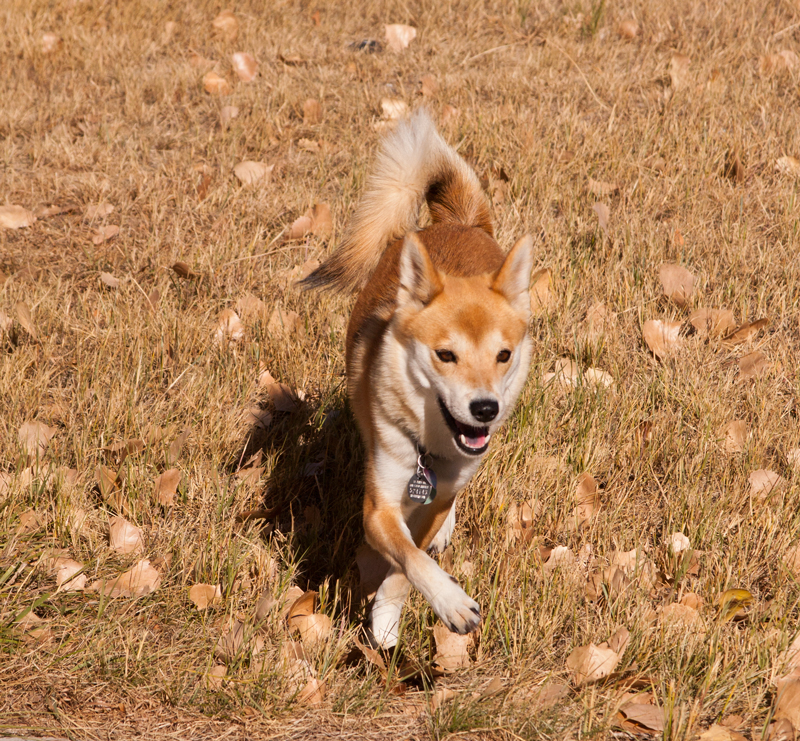
Pic of my puppy, Foxy. (Hubby took pic). Anyway, I obviously don't know anything about photoshop, let alone CS5. I didn't make many changes. I did change the lighting to daylight which brought everything to it's natural reddish orange tinge and I cropped it. Some other slight adjustments of things I know nothing about and this is what results.
I'm thinking I should probably focus on learning one thing each day in photoshop and really understanding that one control instead of just going in and moving sliders :-)
So, my goal tomorrow is to pick one technique to really study and learn and just apply that to the photos.
Very cute dog! The only problem I see is with contrast, mabey its just that all the tones are looking the same to me and the dog doesn't stand out like it should.
My suggestion for starting cs5 (and i have only cs3 but i would imagaine it's pretty much the same in this respect) would be to use a levels layer. I think this picture looks a little too bright - playing with the levels sliders would help it maybe - and then you can also get used toi the idea of painting effects in and out on the layer mask - which is the biggest thing of all. Remember to use the icon at the bottom of the layers palette to start your levels command - if you use the commands in the menu bar at the top of the screen the change will be applied to the whole image with no layer mask to work with.
Adorable. I love how her paws are crossed. I also think this is a good start, but if you wanted to work on anything, I'd say to try to separate the doggie from the background. Right now everything has the same lighting values and color scheme, so she sort of blends in. The only way to learn is just play. Use a copy that you can always delete and start over. I just got CS5 a couple of months ago and it's been a vertical learning curve. Of course, I'm rather dense, but I'm getting there. Sometimes the coolest effects are when you make a "mistake".
Aawww! What a cute puppy! I don't have CS5 so I'm afraid I'll be no help whatsoever in that regard. But, I'll still ooooh & aaaahh over your pictures! LOL!
Nicely captured action. I like the expression on Foxy's face. I think it'd crop differently, putting Foxy off to one side (likely the right side of the image) and likely creating a square image (given your original). I think the centered subject doesn't create as much interest in the subject.
Hi Julie, cute pup. I agree with everyone else, just wile away the hours playing with PS. A good starting point is to work through and get familiar with all the adjustment layers first. These affect the image as a whole and are the basic tools of any processing. IMO levels, curves and shadow and highlight are three great starting points. don't forget to duplicate your image first so that you are working on a copy and keep the original just in case you need to start again.....on another copy of course. Enjoy...
foxy is an excellent lush looking dog .. love the way he/she's running .. looks like a girl but looks can be deceiving .. !! .. its a great crop .. also interesting, coz usually focus on the subject is the way to go but you've got it the other way around .. it works for me .. the dog soft and gorgeous against the sharp grass ..
ps. have fun learning photoshop .. i reckon you could learn something new every single day for 100 years and still have more to learn ..
I'm still very new on photoshop as well but I think you've done a fantastic job editing it, especially comparing it to the original. One of the first things I learnt was levels (Ctrl + L) and you can darken/lighten the blacks, the midtones and the higlights. I think it's great IMO.
As for improvements that I could spot, would be maybe sharpening it a bit and adding a bit more contrast but I'm still a noob so listen to some more people as well.




 Add photograph to your favorites
 Add photographer to your favorites


 Photographer found comment helpful.


