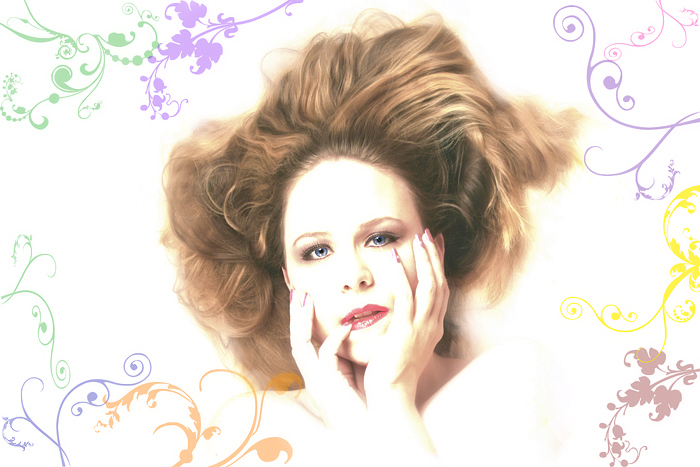
I began by creating a new file with a white bg in ps at the same size of my original photo.
I then made 9 blank layers.
On each layer I stamped a floral swirl in a different colour then went back and positioned them and sized/reshaped/rotated them with the transform tool.
I cropped me out of the other photo leaving a lot of extra stuff around me and using the move tool, did a click and drag and moved me to the new photo.
I then used the layer tool and sent me to the back layer.
I used the eraser tool at 100%, 100% very soft edge and erased everything that I wanted to remove (thinking back, I am pretty sure I should have removed that blob of hair on the right).
Then, on that layer, I increased the contrast and brightness until I had the right look on the skin.
I also went to hue/sat and desaturated the reds and yellows a bit.
I then took my eraser again set to 24%, 24% and blended a little here and there.
Reduced the brush to 12%, 16% and blended some more.
I used the transform tool and rotated my head to match better with the floral prints.
I used another blank layer and coloured back in the eyes with the blending mode set to colour and a very soft brush set at 100%, 100% and the colour sampled from the eye. Reduced opacity to 24% and used the eraser to clean up the edges.
I did the same thing as above for the lips.
Finally, I flattened the image.
USM at 200, 2.5, 2
Set History brush back to the flattened image and went over everything but my face.
Resized
USM at 50, 0.5, 0
History brush set to resize again on everything but my face.
I think that's it, if you have any ?s feel free to ask :)
I love this - a new favorite for me. I love that the shot is fanciful and dreamy.. inspires me to think about going further and and makeing a shot extra special.
What a beautiful edit, a new fav! Very cute image to start with, but you've taken it over the top with the high-key effect and colorful, whimsical designs! Just marvelous!!!!
bloody brilliant .. i love wot you've done with the brushes and how you've processed your face .. its really a work of art .. i'd take my hat off to you if i wore one .. !!..:)
Steps are fantastic (did you take notes as you went or what?). great image. the high key almost makes your face look like a mask. eyes are super sharp. nice work.
you should check out psdtuts.com. its my personal favorite photoshop tutorial site on the web and they have TONS of graphic design stuff like this--they also have their own flickr group worth checking out too.
Nice work here. I'd only say to use a mask instead of eraser--its non destructive that way and easier to get back mistakes.
WOWEE- first of all- you are a GLAM QUEEN !!!! I'm thinking you must have been a model at some point ...
Second- the editing is more than amazing- I read the steps till I got dizzy , then just admired the result :)




 Add photograph to your favorites
 Add photographer to your favorites

 Photographer found comment helpful.


