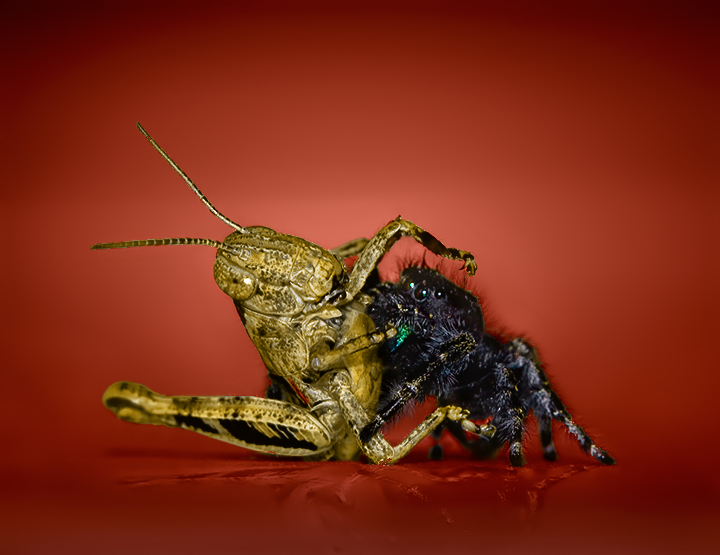
Wow! The addition of the red backdrop adds a bold vibrancy to the final composition - a grand departure from the drab browns & grey backdrop in the original. The addition of the reflection was a nice touch for it helps "ground" the image -rather then it looking like it is floating in the air. The colors, tones, and contrasts in the insects are much more dynamic and vibrant in the final composition. Super job on the editing - love how you can clearly see the black hairs sticking up and out on the spiders head.
I love your choice of background color, and what a fantastic job you did of selecting the bugs! The reflection is the icing on the cake, this is wonderful!
That's an impressive edit. The DOF for a shot at this level is huge. You didn't post the aperture setting with the images. The reflections are "killer"!
Who's leading this dance?
I'd really like to know how you did the reflection. That's exceedingly cool.
I used the transform tools (scale, distort, perspective and skew) to warp it into shape. I used a duplicate layer for this and I also flipped it. Basically what I did was squeeze the image using the scale transform and then I used the perspective and distort tools to align the details so that it matched up with what is suppose to be creating the reflection. What also helps is to transform the image in parts which is what I did here. In other words, after I resized it into place I then selected part of the layer where the leg detail was and then transformed only that using the perspective and skew tools so that the legs parts would align right. What I did was pretty sloppy. I should have done it later in the editing process which I didn't do so when it was flatten it got a little messed up after I started doing some other things. Ideally the reflection should have some color of the subjects that are supposedly causing the reflection rather than just take on the all of the color of the surface.
Oh, that's all? :-)
Crazy how much detail you were able to pull out of both of these. The eyes on that spider are freakin me out!
I'd really like to know how you did the reflection. That's exceedingly cool.
I used the transform tools (scale, distort, perspective and skew) to warp it into shape. I used a duplicate layer for this and I also flipped it. Basically what I did was squeeze the image using the scale transform and then I used the perspective and distort tools to align the details so that it matched up with what is suppose to be creating the reflection. What also helps is to transform the image in parts which is what I did here. In other words, after I resized it into place I then selected part of the layer where the leg detail was and then transformed only that using the perspective and skew tools so that the legs parts would align right. What I did was pretty sloppy. I should have done it later in the editing process which I didn't do so when it was flatten it got a little messed up after I started doing some other things. Ideally the reflection should have some color of the subjects that are supposedly causing the reflection rather than just take on the all of the color of the surface.
Fantastic work! Love the colours and the reflection! What method did you use to change the b/g?
I used the magic wand tool on the background to get most of the selection. I may have chosen a specifc channel to do it in, I forget. Afterwards I used a soft brush to fine tune the mask.
Love the edit. Totally. I'd really like to know how you did the reflection. That's exceedingly cool.
Oh...I just noticed a red spot on the body of the grasshopper, just above the back leg, and other small ones on the two bottom legs. I'm guessing those are just an oversight because you were working quickly.




 Add photograph to your favorites
 Add photographer to your favorites


 Photographer found comment helpful.


