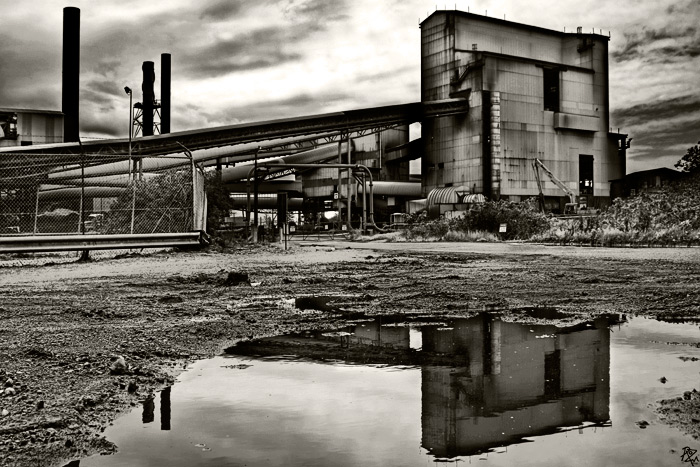
a factory in wollongong ..
and two other photographs of a different factory taken on the same day ..
after alice and joe asked how i processed this i'll put this workflow in here ..
processed twice thru RAW program to make sky fit in with land .. if sky was dark then land was too dark etc ... selectively erased so i had dark sky with light land area ...
skewed image coz it was leaning a bit ..
did a lucisart exposure .. OF COURSE !!! ..
i then duplicated the lucisart layer and did a blending mode multiply and erased the effect in the areas where i didnt want it .. i've forgotten where now ..
did two adjustment layers in levels, one to darken sky more and one to lighten reflection of building more ..
flattened image ..
in newly flattened image (which i save-as with 'flatten' added to the title name) i skewed again ..
then i did adjustment layers in curves .. a cross process which i opaqued to 13% ..
adjustment layer in selective colour and took white down to -100 ..
adjustment layer in brightness and contrast where i increased contrast to +89 and lessened brightness to -33 .. that action made it very dramatic ..
adjustment layer in black & white which is a new one in CS3 .. CS2 doesnt have it .. i made the hue 42 and saturation 5% .. i adjusted the colours as well ..
i put in my little logo coz i'm making it a print and saved for web ..
thankyou so much joe Lowcivicman99and neil walrus451 .. i'll be doing that instead of flattening at the first opportunity .. probably in less than an hour .. !! :)
wonderful processing!! Joe is correct that it's sometimes better to use "stamp visible" so that you can still go back and edit previous layers. but you can skip the "n" in photoshop CS and above...
Thanks for the info. I noticed that you used the flatten layer method instead of a new stamp.
Instead of flatten layer try this and see if you like it.
(on a pc) hold down SHIFT+CTRL+ALT and tap N then E.
N will create a new layer and E will stamp all the visible layers. That way you don't need to flatten your layers for a new adjustment and gives you the control to edit them even after the fact.
What a difference your PP does to the image! I couldn't believe it if I did not see the originals you posted... It gives a post-nuclear war feeling to it, a kind of desolation and erry feeling. Gives me goose bumps. Well deserving of a print IMO.
Great wasteland effect, Roz. Looks like the end of the world, but in a good way. Love your processing and the extremely dark feeling this photo conveys - at least to me.








 Add photograph to your favorites
 Add photographer to your favorites


 Photographer found comment helpful.


