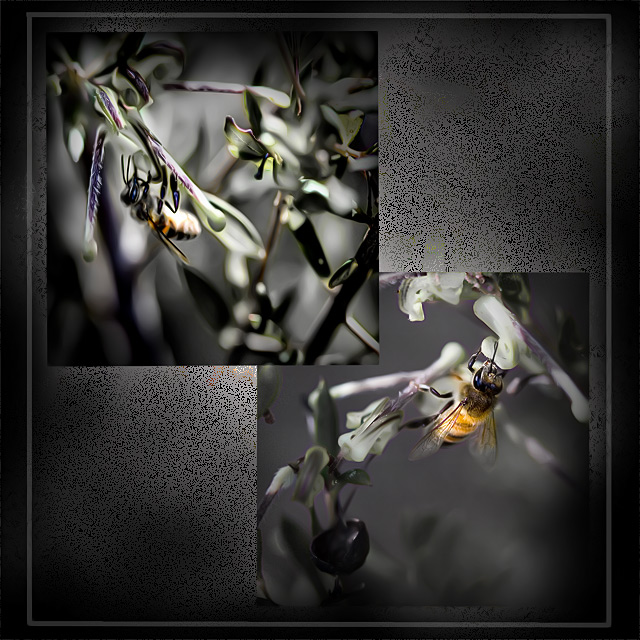
today didnt pan out like i thought it would so i ended up taking photographs on the firetrail of bees .. i'm gonna put them in our 50 day side because they are square crops ..
this image is straight from the camera .. lol lol and ha ha, but hey, it is a square crop!! .. its a buggar trying to make some things live attractively in a square crop .. this would work better rectangular .. but wotever ..
if anyone is wondering how i got this effect ..
i got the bee shot like that by duplicating the background layer .. on the new layer i did a high pass about half way .. i made the high pass layer blending mode saturation .. did a bit of erasing to get the bee's body more colourful ...
to get the background i used one of the bee shots and scaled it as big as the entire image and made it blending mode dissolve.. i then put a grey layer underneath it .. i may've made it opacity 40 or 50% i dont remember ..
i did that border coz ppl in our side have been doing it and i reckon it looks really good .. did a vignette and used the perfectum plug to create that really smooth look ..
The grey tones used to set apart the bee is just excellent. I love your choice of background as well. So funky and interesting. Thanks for including info about what you did.
Really nice processing on this. I tried shooting some bees as it was getting but it was getting too dark and I had ISO cranked up and my DOF was so small (at 200mm) that none turned out well. You really nailed it on the lower right bee! Thanks for the processing tips.
Roz this is sooooooooooooooooooooo cool. Two wonderful shots and the way you have framed them on the diptych with the grey empty space is beautiful. The overall effect is very professional and if I was walking round a gallery and saw this it would be the kind of image that would really grab my attention
Wow. I like the effect and the presentation is great. Good job Roz. I am copying down the steps as I am a CS2 beginner and look for great new processing effects. Thanks for the detail.





 Add photograph to your favorites
 Add photographer to your favorites


 Photographer found comment helpful.


