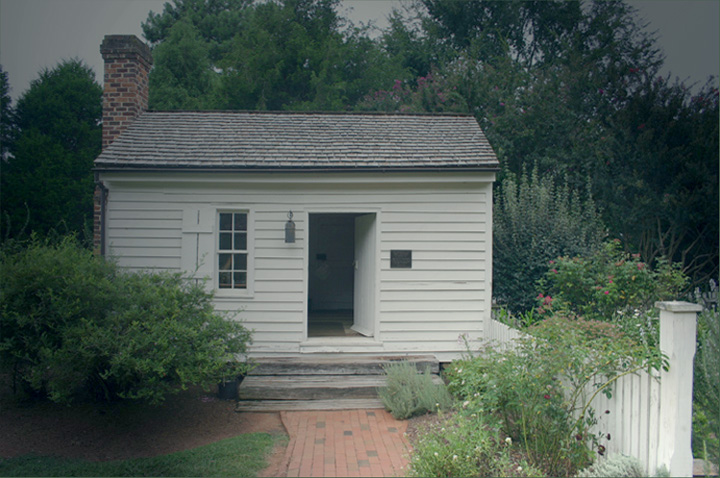
Used a lighting filter to assist with darkening the background clouds.
Added some green to enhance the green bushes.
It was intended to look like an old color photo, The shot was take during a Thunder Storm. Thanks for all your comments
Statistics
Place: 653 out of 684 Avg (all users): 4.3478 Avg (commenters): 4.2500 Avg (participants): 4.2650 Avg (non-participants): 4.6604 Views since voting: 948 Views during voting: 332 Votes: 253 Comments: 17 Favorites: 0
The shadowing or vinette on this picture is strange, it almost makes it look like a picture of a picture, I would have liked to see this sharp and with vidid colors.
The upper portion of this image is lacking contrast and makes the overall appearance unbalanced in my opinion. The subject matter is pleasant and could use a little counter-clockwise rotation to level it.
This seems to be very gray and I can't quite figure out why. Not sure if it was underexposed of if you applied a gradient of some kind. If you get a chance to shoot this again - and it's a neat subject for a picture - try shooting from a lower angle, to take the viewer more up the path.
A good subject and composition but the overall picture seems rather hazy and lacking in contrast. This shot would have benefited from something of colour in the foreground I think.
looks like a picture of a print to me. weird. not sure how you acheived this effect. I'll be interested in reading your photographers ntoes if you have any.
Lighting seems very uneven on this one. An exposure compensation in post processing would have let you lighten the trees and bushes without disturbing the nice whites of the building and fence. Overall a pleasing composition.
This subject has a lot of potential. However, your picture suffers from a few problems. The good news is you can correct all of them either by taking it again or in processing. :)
First, it's very low contrast. Try using the auto levels feature in your software. Or search Google for "Photoshop levels" or "Photoshop curves." Many programs other than Photoshop offer those features; I just find it easiest to find tutorials using Photoshop as a keyword.
Second, the dead straight-on angle isn't nearly as interesting as I'm sure you could find. Try going to one corner, or putting the house in one corner of the pic, or catching the angle of the roof against the sky.
Finally, and this isn't as critical as the other two, it's probably not as sharp as it could be. It seems like it's focused fine, but digital photos always are a little blurred in the fine detail when they come out of the camera. Try playing around with either the sharpen command in your software or experiment with/learn about the "unsharp mask."






 Add photograph to your favorites
 Add photographer to your favorites


 Photographer found comment helpful.


