5) Duplicated Background at 100% (a step I always take for editing)
6) Applied Gaussian Blur to edit layer at 16px then Edit | Fade to 50%
7) Shadow/Highlight adjustment on the edit layer.
Shadow: 35/50/30
Highlight: 1/15/30
Color Correction: 0
Midtone Contrast: 0
Black clip: 0.01
White clip: 0
8) Flatten (throwing away original background layer)
9) Slightly tilted crop
10) Reduce size
11) Add border
12) Local Contrast USM: 6% 60px 0
13) Final sharpen USM: 90% 0.8px 6
--------------
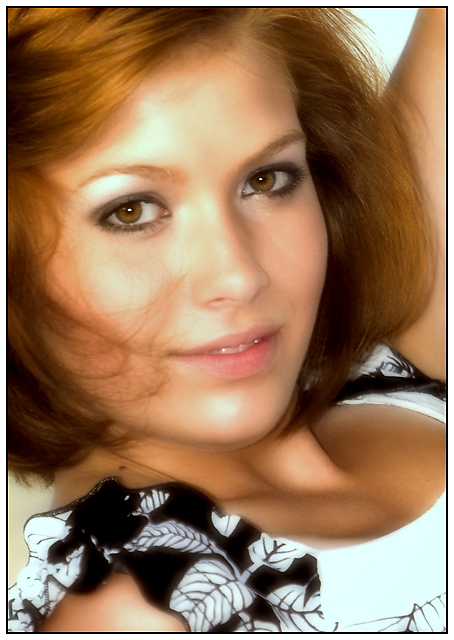
I tried applying a soft filter to many different people pictures and they all turned out the same. BLURRY EYES! I can't stand blurry eyes. Even when doing as Kirbic suggested (Gaussian blur at 4px then fade to 25%). I was about to give up thinking that what I wanted couldn't be done in basic!
What I like about the technique used here is that, in spite of the fact that the image was blurred, her eyes *still* appear to be sharp. I think the key things are: 1) I blurred at a much higher radius than Kirbic suggested. 2) I kept most of the blur so her hair and such still looks blurry. 3) Then after reducing the size and sharpening, the eyes came back into sharp focus.
I love it! I hope the voters do too. And I hope they will forgive the blown highlights on her arm, it was in the sun while she was in shade, but I still loved this pose and the look on her face.
Statistics
Place: 51 out of 252 Avg (all users): 5.8787 Avg (commenters): 7.2500 Avg (participants): 5.6000 Avg (non-participants): 5.9941 Views since voting: 1154 Views during voting: 375 Votes: 239 Comments: 9 Favorites: 2 (view)
nice portrait. I like the soft look
What I do not like are the highlights on forehead near right eye and chin and the position of the left arm, seems a bit awkward







 Add photograph to your favorites
 Add photographer to your favorites


 Photographer found comment helpful.


