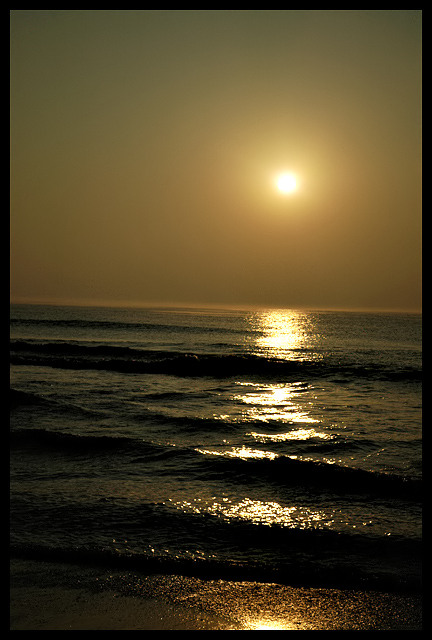
This is a sunrise at Corolla, NC in the Outer Banks. My whole family rented a house for a week this summer, and one day I went out early to shoot the sunrise. I was too late to get shots of the sun coming out of the ocean, but I still got some good shots. When I opened this photo, I was shocked at how dark it was, I guess cause I exposed, unwittingly, for the highlights on the waves. I did do some cloning around the sun, because it looked like a diamond, instead of a circle.
I like the play of light in the photo - is it the best I took in 2005? Who knows.
Statistics
Place: 521 out of 833 Avg (all users): 5.3888 Avg (commenters): 5.5000 Avg (participants): 5.3042 Avg (non-participants): 5.8056 Views since voting: 872 Views during voting: 546 Votes: 427 Comments: 29 Favorites: 0
I love the water tones, and the light shining on the water, but can't you see that the horizon isn't straight, as this pulls the image down a bit, and thats a such a shame.
I feel this photo could have benefited greatly from a CCW rotation in order to level the horizon. As the photo is so strongly tied to the horizon, this is a major distraction for me. The colours and sofnes of the sky are nice. I'm not sure if a longer exposure would have brough more mood to the water or not. JMO.
I'm a real sucker for these sunrise/sunset photographs. I like the cool colour tones. There is one thing letting this down for me & that is I personally would have liked to see the horizon level.
almost beautiful... the horizon is tilting, and that is enough to destroy you image, and to make things worse.. you placed the horizon in the center of the image..
but I'm not the kind that only says it's bad, this could be beautiful, so in case you are not very good with photoshop, but still have it..
first open the picture, then zoom out so it doesn't fill your screen, then press CTRL-T (transform) then you get points in every corner and in the center of each outline, place the pointer at one corner, the pointer should turn to an arrow that is bent in a corner, click the mousebutton and hold it down ,drag the corner to one side until the horizon is straight. then press Enter. then crop the image, and either cut of the top or of the bottom so the horizon gets close to one third from top or bottom.
Lovely color and detail. Two suggestions - straighten the horizon and crop so the horizon is not in the center of the shot. Otherwise - very nice image.
Nice colour and misty feel, not sure if the unlevel horizon is a great idea but nor does it detract too much, and the reflection is worth it's weight in gold in this one. Well executed, 8/10







 Add photograph to your favorites
 Add photographer to your favorites


 Photographer found comment helpful.


