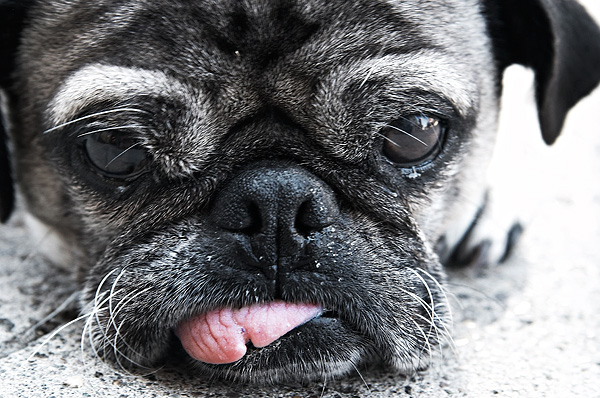
Slight changes to exposure compensation, saturation and contrast in CaptureOne Pro Demo. Heavy sharpening applied, and converted to JPEG. Curves (S-curve), Channel mixer layer to monochrome - which was then set to about 65% opacity and the tongue was masked out. Added a dodge/burn layer by going to Layer-->New-->Layer and then setting mode to Overlay and choosing to fill with 50% gray. This was then used to dodge/burn as a non-destructive way of getting the job done. Sharpening was then applied, resized.. and another round of sharpening applied to only the eyes and tongue.
awww - what a sweet old puggy. I just love the seniors. They have a special place in my heart. One of mine has his tongue sticking out all the time - he's 16 years old.
This dodge and burn thing is completely beyond me but I will say I like this one better than the original, which was entirely too light. You managed to add a lot of contrast without making it seem unnatural...something I still have to learn. Great job.
Your editing has added a lot of contrast. makes the poor dog look older. I dont think any amount of editing could make him attractive, he has one of those only-a-mother-could love faces. Perhaps I wish that some of the brown could have stayed, instead of turning so much to black and white. But it is a nice artsy portrait in the final edit.
This is a hard one to comment on- I see the changes and they are very slight but do make a difference. I do seem to look at the eyes more in this one which is a good thing! Also I noticed the ear looks better- less distracting.
Your editing has been very effective. I would say that your original suffered a lot from over exposure problems (blown highlights, and generally low contrast) but you have suceeded in turning that shot into an successful artistic high key photo. The burning and dodging really brings out the eyes and the whole face in general, where as compared with the no dodge/burn version the focal point seemed to be majorly on the nose.
You do dodge/burn a bit differently that i do, but there is no right or wrong way of doing things (though i would say yours is 'righter' than mine) and the results should be pretty much the same. Maybe i'll try your method sometime :-)
PS - my way of doing dodge/burn doesnt involve layers, i just do it directly on the photo with the brush tool... it is more destructive, and harder to modify but its just the way im used to.




 Add photograph to your favorites
 Add photographer to your favorites

 Photographer found comment helpful.


