PS work:
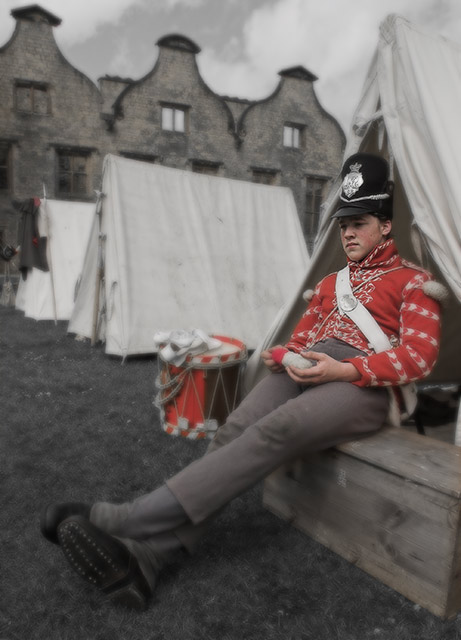
Desat an all but red channel
Duplicate layer, gaussian blur, mask and remove around fave and tunic.
Reduce transparency of gaussian blur layer to suit.
Saturate the red channel more
Contrast and brightness to taste
File Name
CRW_6254.CRW
Camera Model Name
Canon EOS 10D
Shooting Date/Time
02/05/2005 10:06:50
Shooting Mode
Aperture-Priority AE
Tv( Shutter Speed )
1/1000
Av( Aperture Value )
4.5
Metering Mode
Center-weighted averaging
Exposure Compensation
-1/2
Autoexposure Bracketing
-1/2
ISO Speed
100
Lens
16.0 - 35.0mm
Focal Length
16.0mm
Image Size
3072x2048
Image Quality
RAW
Flash
Off
White Balance
Auto
AF Mode
One-Shot AF
Parameters
Contrast Normal
Sharpness Normal
Color saturation Normal
Color tone Normal
Color Space
Adobe RGB
File Size
5671KB
Statistics
Place: 16 out of 114 Avg (all users): 6.3641 Avg (commenters): 8.1429 Avg (participants): 6.2874 Avg (non-participants): 6.4154 Views since voting: 955 Views during voting: 344 Votes: 217 Comments: 22 Favorites: 0
I like the use of selective desaturation here. The fact that the colours left behind are not too 'in your face' is welcome. I also like the soft-focus effect, although I feel that the sleeves of the jacket could perhaps do with being somewhat sharper.
You have strange dreams for sure - lucky you managed to find an old army camp complete with drummer lying around ; )
The selective focus and selective desaturation both work really well on this shot to create a nice muted effect. Not a photo that leaps out and grabs me, but well shot and presented anyway.
I love this!! nice selective desaturization, composition, subject...it's all perfecto in my little book 10 (and hip hip hurray for soft focus!!! it does work in the dream theme!)





 Add photograph to your favorites
 Add photographer to your favorites


 Photographer found comment helpful.


