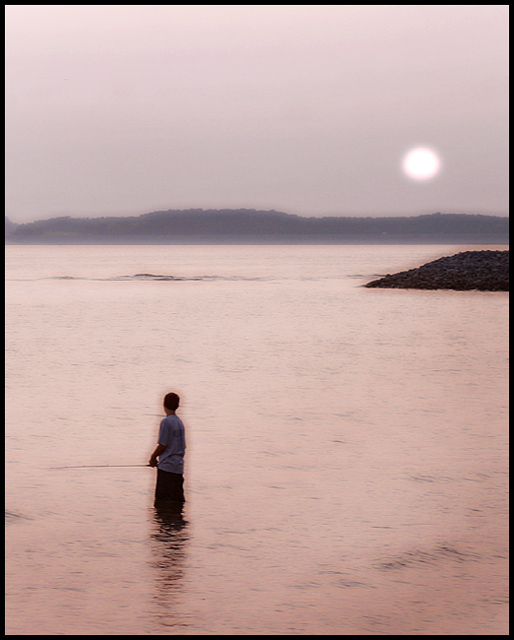
This is a nice shot. It suffers from a whole lot of haloing. It appears that there are selected areas and then blur applied to it. The colors are darker around the boy, the rocks on the right and along the top of the horizon line. Something to work with would be the Pen tool (makes Paths), this would make tighter selecitons and decrease these types of problems.
I can't say I'm fond of the post-processing here. It looks like there was too much effort put into selectively blurring portions of the shot, particularly the odd glow around the fisherman.
Whatever filter you used or did that created the haloes around the boy and the land ruined the photo for me. I do think it would have been better off without.
Nice soft feeling about this image, but that halo around the kid in the water is very distracting. I have no idea what technique you used, but I'm pretty sure that proper use of gaussian blur could have avoided this artifact. I'm just learning how to use Gaussian Blur myself and am quickly realizing that it can work wonders.
Don't know about those dark halos - but intrigued to know what they're an artefact of. Wonderful scene, and those odd things are the more of a shame for it. It'd be a pretty off-the-wall guide to publish this, no? A good clean version would be a pretty sure near winner, I'd think. Like this ...
Creative shot -- very well composed, (a bit of an odd glow around your main subject??) I don't know if the artistic/watercolor effect says "Travel Guide" to me but I do like the colors and the light effects.
I can tell there was extensive dodging done because I see a small dark halo around the person and the shadow as well as the stone piling on the right. Not that it's very distracting but it is fairly obvious. Not sure how much could have been saved you used levels and curves instead or tried different exposures.
I love this photograph. I'm a big fan of softening but whatever technique you used has left a strange halo like blurriness around the figure as well as in other places which I feel takes away from the image. 9





 Add photograph to your favorites
 Add photographer to your favorites


 Photographer found comment helpful.


