| Author | Thread |
|
|
07/16/2009 05:02:31 AM · #1 |
I'm batch processing about 500 pictures and I can't figure out a way to disable the 'jpg option' box(the one that lets you specify jpg compression). It's annoying because I don't want to sit here and click 'OK' or hit 'enter' to continue to the next picture. I'm grabbing the files from a folder and then i've selected 'Save and Close', intending to resave them in the same folder. I'm using PS 7 FWIW.(please keep the dark ages jokes to yourself) ;)
I'm heading to bed but it would be peachy if anyone knows the solution to this problem.
Here is a screenshot of the 'jpg option' box. 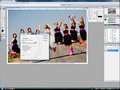
Here is a picture of my batch setup. 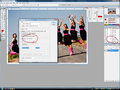
One can of California Almonds to the first person to provide a solution(North America pls.) :) If you solve my problem and you aren't in north america, i will send you a funny ecard on your birthday. Thanks!
eta; i've got to go to sleep but i'll look forward to checking this thread in the morning.
Message edited by author 2009-07-16 05:03:07. |
|
|
|
07/16/2009 05:26:09 AM · #2 |
Hey Mark,
Try this: when creating the action, you must save the images, including the JPEG dialog box for your choice of JPEG quality as part of the action, and then stop recording the action.
Then, in the Batch Action window, check "Overide action Save As commands"
Yummmmmm.... almonds :O) |
|
|
|
07/16/2009 10:36:12 AM · #3 |
Originally posted by roba:
Hey Mark,
Try this: when creating the action, you must save the images, including the JPEG dialog box for your choice of JPEG quality as part of the action, and then stop recording the action.
Then, in the Batch Action window, check "Overide action Save As commands"
Yummmmmm.... almonds :O) |
It worked!! Thank you!
pm me your address and i'll get 'em in route.(next week sometime as I'm camping for a few days starting today) |
|
Home -
Challenges -
Community -
League -
Photos -
Cameras -
Lenses -
Learn -
Help -
Terms of Use -
Privacy -
Top ^
DPChallenge, and website content and design, Copyright © 2001-2026 Challenging Technologies, LLC.
All digital photo copyrights belong to the photographers and may not be used without permission.
Current Server Time: 05/10/2026 03:49:48 AM EDT.




