| Author | Thread |
|
|
11/12/2008 05:22:40 PM · #26 |
Here's the DPP options, so I'm not sure that is the problem.

I'm using DPP from my Rebel XT, is DPP camera specific or Canon only specific.
|
|
|
|
11/12/2008 05:26:02 PM · #27 |
Maybe I need to splurge on Lightroom or Aperature or something cuz now that I have noticed it it is driving me nuts, arghh.
|
|
|
|
11/12/2008 05:57:11 PM · #28 |
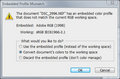
(sorry to jump in with my Nikon :P) Along these lines, when I open RAW files I get an "embedded profile mismatch" dialog box through which I convert from "Adobe RGB (1998)" to my current working space "sRGB IEC61966-2.1" Is this a conversion that may be detrimental to my images?
|
|
|
|
11/12/2008 06:24:23 PM · #29 |
Originally posted by JMart:
(sorry to jump in with my Nikon :P) Along these lines, when I open RAW files I get an "embedded profile mismatch" dialog box through which I convert from "Adobe RGB (1998)" to my current working space "sRGB IEC61966-2.1" Is this a conversion that may be detrimental to my images?
|
Nope. you may see if youcan change the profile IN CAMERA to sRGB, if that is what you are going to shoot and edit in.
|
|
|
|
11/12/2008 06:25:28 PM · #30 |
Originally posted by goinskiing:
Here's the DPP options, so I'm not sure that is the problem.
I'm using DPP from my Rebel XT, is DPP camera specific or Canon only specific. |
I would set the CMS Settings for print to the Monitor Profile you calibrated earlier. See what happens
Message edited by author 2008-11-12 18:25:39.
|
|
|
|
11/12/2008 06:28:08 PM · #31 |
Originally posted by JMart:
(sorry to jump in with my Nikon :P) Along these lines, when I open RAW files I get an "embedded profile mismatch" dialog box through which I convert from "Adobe RGB (1998)" to my current working space "sRGB IEC61966-2.1" Is this a conversion that may be detrimental to my images?
|
I believe the working space option is related to the color profile set up by a calibration device, I use spyder 2 and get that same message. |
|
|
|
11/12/2008 06:34:15 PM · #32 |
Originally posted by cpanaioti:
Originally posted by goinskiing:
Okay, here's what I am seeing visually with my last post:

The right is what I see in DPP (sRGB) after I make my adjustments. If I either covert to JPG with embedded ICC or transfer into CS3 (sRB 2.1), I get a color shift as seen on the left. Something just seems a tad off. |
I think you're using the wrong profile in CS3. From what you've stated it should be sRGB, not sRGB 2.1. Or is that a typo?
Also, on you're preferences, how do you deal with profile mismatches? |
Any ideas?
|
|
Home -
Challenges -
Community -
League -
Photos -
Cameras -
Lenses -
Learn -
Help -
Terms of Use -
Privacy -
Top ^
DPChallenge, and website content and design, Copyright © 2001-2026 Challenging Technologies, LLC.
All digital photo copyrights belong to the photographers and may not be used without permission.
Current Server Time: 05/11/2026 03:27:51 AM EDT.




