| Author | Thread |
|
|
05/10/2008 11:14:25 PM · #1 |

Submitted the photograph above in the HEALTHY FOOD challenge and appreciate all of the nice comments made by DPC folks. I'm pretty new around here, but this scored a personal best, so I was pleased with the results. A few folks suggested that the color looked fake or unnatural though, which concerns me as I did VERY mimimal post-processing. I warmed once and sharpened once --- and that was it. I do however have my D300 set for vivid colors, because I tend to like that palette. Maybe the rest of the world does not...? Do other D300 folks use the VIVID setting? I would be interested to know. Thanks. |
|
|
|
05/10/2008 11:33:12 PM · #2 |
| As you can see, I don't use Nikon, so I have not comment about using vivid color. BUT the photo looks very good to me, and obviously, judging by the score, it looked very good to many people. My advice is don't mess with success. There are a lot of monitors out there, and they can be drastically different in displaying colors. |
|
|
|
05/10/2008 11:33:32 PM · #3 |
It's either the VIVID setting or an exposure issue. I started a thread last year, because my reds were glowing. I don't think I had it on VIVID, but I think I had my saturation boosted. The combination of that and exposure were what did it for me. If you like your outcome though, by all means keep it up. In my case, I didn't like that I was losing detail, because of the glow.
Red Hot
|
|
|
|
05/10/2008 11:43:20 PM · #4 |
Saturation seems to go over well with the voters here at DPC.
I use a Fuji S3, and once in a while I will use a manual setting to add saturation. I usually shoot with Fuji's "Slide Film Simulation", and cloudy day white balance, which gives me a similar result.
I like your example shot.
|
|
|
|
05/10/2008 11:49:25 PM · #5 |
I will switch to vivid when I am shooting landscapes, outside scenery..etc... But I use ND most of the time because I do alot more portrait work. But i love having that option!
|
|
|
|
05/10/2008 11:55:03 PM · #6 |
I use vivid and sometimes I take it even further with custom presets. It is not about voters, it is about what you like.
Fool or not but I agree with Ken here. D300 has great color.
//www.kenrockwell.com/nikon/d300/color.htm
Also, get his custom profile. It is great for bold color. Be carefull using it on people.
//www.kenrockwell.com/nikon/d300/picture-control.htm |
|
|
|
05/11/2008 01:02:01 AM · #7 |
I have my D80 set to RAW+JPEG, and the JPEG set to Vivid.
I often find the JPEGs in vivid more to my taste than what I can do with the RAW. Maybe it's just me, but using Lightroom and even PS I find it hard to match their JPEG processing!
Here's a gallery of photos from Washington Park in Albany a week before the tulip festival--I was messing with the RAWs in Lightroom, then I looked at the JPEGs, and ended up just posting them "as shot" to the gallery. A couple have been cropped, but most are straight from the camera.
|
|
|
|
05/11/2008 02:47:19 AM · #8 |
Many monitors see different colors. I asked about this here and it may interest you:
How does this look on your monitor?
I have my monitor calibrated with Spider2. The color appears a bit punched up but not overboard. Hope that helps |
|
|
|
05/11/2008 03:06:11 AM · #9 |
| I shoot everything except people in Vivid +2 Saturation. I love the look! People are certainly not flattered though. For people I use Neutral +2 saturation. |
|
|
|
05/11/2008 08:11:23 AM · #10 |
Thanks to all for the input. An  nshapiro--- your Washington Park pictures are gorgeous. Wow. nshapiro--- your Washington Park pictures are gorgeous. Wow. |
|
|
|
05/11/2008 10:14:59 AM · #11 |
| I have noticed that when I have my D40X set to vivid and I take pictures of something red it really does a number on it. If I know I will be taking pictures of something red I will change it back to normal. But you can always adjust the vividness in PP. |
|
|
|
05/11/2008 10:22:47 AM · #12 |
It is a very good picture. It does not look "overdone" to me.
Keep in mind....it is very hard to win here at DPC and even HARDER to please everyone.
On some of the highest rated pictures you will find comments like...
..."I gave this a 4 because it looks to sharp"...or...."must be set-up because it's too perfect"...
It will drive you nuts if you let it! |
|
|
|
05/11/2008 11:00:23 AM · #13 |
Originally posted by Dirt_Diver:
I have noticed that when I have my D40X set to vivid and I take pictures of something red it really does a number on it. If I know I will be taking pictures of something red I will change it back to normal. But you can always adjust the vividness in PP. |
Yes. And this is not a "Nikon" problem. Canon cameras set to a more aggressive "Picture style" will do the same thing. The real issue is this - shooting in JPEG and using a "vivid" setting can cause one channel to saturate badly, red for instance when shooting a bright red object. The data in that channel are lost, even though there may well be no apparent clipping on a luminosity histogram (because the total luminosity is not saturated, just one channel).
The way to monitor and control this is to use the RGB histogram, if your camera has this option. Shooting RAW can greatly also reduce the issue, because RAW has more "headroom" and the data are not shifted by the in-camera JPEG settings (such as "vivid").
In the case of the OP's shot, yes, I think the colors are a little "over the top." Looking at the blue channel and the RGB histogram, we see this:
 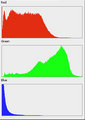
The blue channel is clipped, not at the bright end, but at the dark end. The majority of data for the blue channel has been lost. The color settings are probably in large part to blame for this, although the blue channel *should* be pretty dark for this image.
|
|
|
|
05/11/2008 11:03:57 AM · #14 |
Originally posted by nshapiro:
...
I was messing with the RAWs in Lightroom, then I looked at the JPEGs, and ended up just posting them "as shot" to the gallery. A couple have been cropped, but most are straight from the camera. |
Exactly the reason I don't shoot RAW anymore. |
|
|
|
05/11/2008 12:19:23 PM · #15 |
| radioactive lettuce... ummm! |
|
|
|
05/11/2008 01:12:40 PM · #16 |
From a lot of things I've read, its better to leave all your setting including saturation at "normal". You can always increase sharpness, saturation etc later. If the camera doesn't do it correctly in camera its harder to fix it later on.
Of course on the flip side, if you have success with these settings in-camera, that's one less step of postprocessing you need to do.
Message edited by author 2008-05-11 17:18:32.
|
|
Home -
Challenges -
Community -
League -
Photos -
Cameras -
Lenses -
Learn -
Help -
Terms of Use -
Privacy -
Top ^
DPChallenge, and website content and design, Copyright © 2001-2026 Challenging Technologies, LLC.
All digital photo copyrights belong to the photographers and may not be used without permission.
Current Server Time: 05/12/2026 07:40:05 AM EDT.




