| Author | Thread |
|
|
12/03/2025 11:19:42 PM · #1 |
|
What exactly is deemed as "clip art" and is it NOT allowed in extended? |
|
|
|
12/04/2025 10:10:35 AM · #2 |
Well, Extended editing does incorporate the Common Editing rules, which is where I believe you picked up this question.
It's a good question. Off the top of my head I'd say that you'd recognize it when you see it. :-) But, just in case, I am raising this question up to a group conversation in the SC discussion area for review.
In the meantime, if you're not sure, I'd either avoid using imported files that aren't actual images you've taken, OR, submit it to us in advance for a SC opinion. |
|
|
|
12/04/2025 11:08:25 AM · #3 |
|
In my opinion, clip art are simplified images, and as images they cannot be added to a DPC challenge entry even in Extended since they do not conform to thecsource and date requirements. Only textures are allowed as an exception from this rule, and clip art is not a texture. However, if you can make your own clip art image either from your own valid photo or from scratch in photoshop... it would probably be legal. |
|
|
|
12/04/2025 11:13:58 AM · #4 |
I think Lev has it on the money. For my own two cents. An example that came up for me, though, that's of a much more "gray" nature is borders/frames. Clearly, the use of border filters and overlays is allowed, but what's less clear is whether "clip-art-like" borders are permitted around the outer edges of photos, even in Extended Editing.
This came up for me in the context of the Postage Stamp challenge earlier this year. At first, I was using a graphics element to create my "stamp effect" border--albeit with the area of the stamp itself 100% legal within Extended Editing rules. But it occurred to me after I had done so that the stamp border/frame (a graphical element I didn't create that was being used for something other than an obvious texture) might fall afoul of the Common Editing rule set. So I decided to remove it and create the effect myself using a combination of software and desktop publishing tools instead. It was much more tedious, and while I'm quite happy that I did it that way, I do wonder if I could have saved myself an hour of processing time by just slapping the graphical border on it instead. |
|
|
|
12/04/2025 02:26:31 PM · #5 |
Originally posted by kanaj:
I think Lev has it on the money. For my own two cents. An example that came up for me, though, that's of a much more "gray" nature is borders/frames. Clearly, the use of border filters and overlays is allowed, but what's less clear is whether "clip-art-like" borders are permitted around the outer edges of photos, even in Extended Editing.
This came up for me in the context of the Postage Stamp challenge earlier this year. At first, I was using a graphics element to create my "stamp effect" border--albeit with the area of the stamp itself 100% legal within Extended Editing rules. But it occurred to me after I had done so that the stamp border/frame (a graphical element I didn't create that was being used for something other than an obvious texture) might fall afoul of the Common Editing rule set. So I decided to remove it and create the effect myself using a combination of software and desktop publishing tools instead. It was much more tedious, and while I'm quite happy that I did it that way, I do wonder if I could have saved myself an hour of processing time by just slapping the graphical border on it instead. |
Th t's why I decided to photograph a real postage stamp for this purpose :) |
|
|
|
12/04/2025 02:58:37 PM · #6 |
Originally posted by LevT:
Th t's why I decided to photograph a real postage stamp for this purpose :) |
Oh? Interesting. We get to see the back of a postcard. :-).
FWIW, we are actively discussing this and will post back soon. I also believe that Lev was spot on with his take as well. |
|
|
|
12/04/2025 03:45:07 PM · #7 |
|
Anita, you know very well that it is not allowed but why not! ;) |
|
|
|
12/04/2025 08:11:59 PM · #8 |
We (SC) discussed it and really couldn't word it much better than what Lev has already done. One exception and clarification, and they've been edited in the following quote. :-)
Originally posted by LevT:
In my opinion, clip art are simplified images, and as images they cannot be added to a DPC challenge entry even in Extended since they do not conform to the source and date requirements. Only textures are allowed as an exception from this rule, and clip art is not a texture. However, if you can make your own clip art image either from your own valid photo or from scratch in image-editing software photoshop... it would probably be legal. |
|
|
|
|
12/04/2025 11:09:47 PM · #9 |
Originally posted by MargaretNet:
Anita, you know very well that it is not allowed but why not! ;) |
I can see why it's not allowed, after all, it would not have been created by me, so that's fair.
Message edited by author 2025-12-04 23:10:02. |
|
|
|
12/04/2025 11:11:11 PM · #10 |
Originally posted by LevT:
In my opinion, clip art are simplified images, and as images they cannot be added to a DPC challenge entry even in Extended since they do not conform to thecsource and date requirements. Only textures are allowed as an exception from this rule, and clip art is not a texture. However, if you can make your own clip art image either from your own valid photo or from scratch in photoshop... it would probably be legal. |
I did look into it before you all replied :O)
But thanks Lev. |
|
|
|
12/04/2025 11:23:27 PM · #11 |
So just to clarify -- this would mean that (in Extended Editing challenges, specifically) if I wanted to do something like add some black "silhouettes" of birds not originally present in my image, what I could NOT do would be to go to a third-party platform like Pixabay and download a free graphical element to use. But what I COULD do is manually create something similar as a vector drawing (SVG, PNG, etc.) within software like Adobe Illustrator or Inkscape, then place those self-created graphical elements within my imagery.
Does that sound correct?
I doubt I'd be good enough to do this myself. I'm only asking because I anticipate there are some very talented graphic designers on here who might be asking to clarify the phrase "If you can make your own clip art image ... from scratch in image-editing software." Some might wonder whether design software like Illustrator or InkScape counts as "image-editing software" or "graphic design software." Same for hybrid solutions like Canva or even Microsoft Publisher.
Of course, I'm aware that you can also create similar elements on a blank canvas within Photoshop or other image-editing software. But in the spirit of the conversation, I thought I'd ask. |
|
|
|
12/04/2025 11:33:32 PM · #12 |
|
How about physically drawing something, photographing it, processing it and compositing it into one's creation? |
|
|
|
12/04/2025 11:47:58 PM · #13 |
Originally posted by kanaj:
So just to clarify -- |
Yes. |
|
|
|
12/04/2025 11:48:15 PM · #14 |
Originally posted by jomari:
How about physically drawing something, photographing it, processing it and compositing it into one's creation? |
Yes. |
|
|
|
03/30/2026 05:43:23 AM · #15 |
I came across this thread, while looking into the Extended editing rules. I’ve been away for a while and a lot has changed. I had a question about using clip art, which I believe this thread answered. However, it got me wondering… would it be acceptable to generate “clip art” using AI and incorporating that into an image, similar to something you drew (as discussed below)?
Apologies if this has been asked and answered before.
Message edited by author 2026-03-30 05:44:29. |
|
|
|
03/30/2026 10:32:33 AM · #16 |
Originally posted by Martus:
I came across this thread, while looking into the Extended editing rules. I’ve been away for a while and a lot has changed. I had a question about using clip art, which I believe this thread answered. However, it got me wondering… would it be acceptable to generate “clip art” using AI and incorporating that into an image, similar to something you drew (as discussed below)?
Apologies if this has been asked and answered before. |
ChatGPT, please draw a box of popcorn and then eat the popcorn.... |
|
|
|
04/01/2026 02:23:01 PM · #17 |
A couple things have always bothered me with extended editing. Let's say I want to create a picture where a grizzly bear is inside my office. To be completely photographic and non derivative I would have to go out and photograph a grizzly bear and then superimpose it inside my office. Under the rules I could not use an older picture that I have of a grizzly bear, someone else's picture of a grizzly bear, a photograph of a different work of arts use of a grizzly bear, nor an AI generated grizzly bear. Theoretically I could draw a grizzly bear within Photoshop using the brush tools even though that would be a separate work of art actually, but I couldn't make a diorama of a big grizzly bear in my office and take a picture because that would be a picture of another artwork even though I created it.
And one of the hallmarks of Street photography is the inclusion of other people's graffiti or artworks (storefront window displays) into your own photo. And it seems rather subjective that we have a group of people saying well “you did that one correct because you had a finger pointing to it so it somehow interacted in juxtaposed with the artwork in such a way as to make your photo a commentary on the artwork”- versus others who say “why should I vote favorably on your “photo” when 90% is somebody else's artwork?”
So what are the acceptable ways to get the “grizzly bear into the office” under extended editing? It seems that it's a contest of who's better at Photoshop rather than photography but it's always been that way- since the days of Gyaban.
|
|
|
|
04/01/2026 03:29:45 PM · #18 |
Originally posted by blindjustice:
It seems that it's a contest of who's better at Photoshop rather than photography but it's always been that way- since the days of Gyaban. |
I miss Gyaban.
|
|
|
|
04/01/2026 03:32:14 PM · #19 |
Basic is all about photography skills.
Extended just adds photo manipulation software to the mix.
They are both rare.
I'm okay with both.
I also enjoy Photoshopping (is that a word?), so I like Extended more than Basic.
I'm also enjoying this conversation.
I do NOT want AI included on this site in any manner.
WE are the artists, not a software program that does it for us, IMHO.
|
|
|
|
04/01/2026 03:38:02 PM · #20 |
Originally posted by Lydia:
Originally posted by blindjustice:
It seems that it's a contest of who's better at Photoshop rather than photography but it's always been that way- since the days of Gyaban. |
I miss Gyaban. |
I am sure we all used to enjoy his polished dystopian creations
|
|
|
|
04/06/2026 07:19:38 PM · #21 |
|
Someone did use AI to add elements to an image and SC DQ'd it. And we DQ'd another image where AI was used to remove a distraction and it added an element in the process. It's just like clipart, really. We can't validate source and date. |
|
|
|
04/07/2026 01:27:47 AM · #22 |
Originally posted by blindjustice:
Let's say I want to create a picture where a grizzly bear is inside my office... |
You could just take a photo of the office and then take a photo of a grizzly bear and...
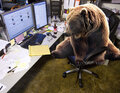
source1 source2 |
|
Home -
Challenges -
Community -
League -
Photos -
Cameras -
Lenses -
Learn -
Help -
Terms of Use -
Privacy -
Top ^
DPChallenge, and website content and design, Copyright © 2001-2026 Challenging Technologies, LLC.
All digital photo copyrights belong to the photographers and may not be used without permission.
Current Server Time: 09/10/2026 06:48:21 AM EDT.




