| Author | Thread |
|
|
02/15/2009 02:04:10 PM · #1 |
Yeah, I know a bunch of you already know the wonders of this little software package, but I just downloaded the trial version today and it seems quite a handy thing! Here's one experiment. The first is the original, just resized; the second is what I would consider my normal (and basic-legal) editing - curves, brightness contrast, USM, sharpen, resize; the third is a Topaz preset called "Crisp" and the fourth is a Topaz preset called "Dramatic". Quite fun!
   
I'm sure there's much more fun to be had, and it can be used to go WAY out there with processing, but so far I kinda like it for certain shots. |
|
|
|
02/15/2009 02:06:52 PM · #2 |
Is Topaz a sharpening application?
|
|
|
|
02/15/2009 02:11:38 PM · #3 |
Sharpening and other adjustments. Has different things that can be tweaked or set. You can start with a preset or just play on your own. They have a 30-day trial period to download it and play with it. Oh, and I did sharpen for the web on the Topaz Adjust versions, too. They may be too sharp. I have a tendency to not sharpen enough for the web - mayhaps I've gone overboard in the other direction!
Message edited by author 2009-02-15 14:37:46. |
|
|
|
02/15/2009 02:50:00 PM · #4 |
| I knew you'd come to the dark side! ROFL!! |
|
|
|
02/15/2009 03:03:25 PM · #5 |
Originally posted by Melethia:
Sharpening and other adjustments. Has different things that can be tweaked or set. You can start with a preset or just play on your own. They have a 30-day trial period to download it and play with it. Oh, and I did sharpen for the web on the Topaz Adjust versions, too. They may be too sharp. I have a tendency to not sharpen enough for the web - mayhaps I've gone overboard in the other direction! |
The Topaz images rarely need sharpening, it's sort of built in. Exception: if you work with the "simplify" preset, you sometimes can add sharpening on top of that to good effect.
But here's something you need to do, for informational purposes: note that in addition to the presets you have tabs for exposure, details, color, and noise. Also, underneath "apply preset" you have a button for "save as". What's happening is that ALL of these presets just represent different proportions of all those various adjustments that are possible. Select "detail" preset then look at the tabs and note the values. Now go back to preset tab and select "simplify" and look at THOSE values. The differences between detail and simplify are all located in the specific values that are chosen among the variables.
So you can just choose a preset that's close to what you want, then you can go into the tabs and adjust parameters until you have exactly what you want, then you can go back to the presets tab and save these parameters as your own, custom preset, which will show up in the list from that point on. So you can work out a very specific "style" for typical applications on your type of photography, and reproduce that with a single click any time you want.
R.
|
|
|
|
02/15/2009 03:10:39 PM · #6 |
| Wow, is there ANYthing that our dear Bear doesn't know? He continually amazes me... :) |
|
|
|
02/15/2009 05:24:48 PM · #7 |
Originally posted by BeeCee:
Wow, is there ANYthing that our dear Bear doesn't know? He continually amazes me... :) |
Lots... But I'm into HDR-stuff, and I own Topaz Adjust, so this one's up my alley. In fact, Deb's messing with it because I urged her to, I believe...
R.
Message edited by author 2009-02-15 17:25:01.
|
|
|
|
02/16/2009 01:06:16 AM · #8 |
| It almost looks like that same thing can be done with a high pass. |
|
|
|
02/16/2009 01:10:10 AM · #9 |
| I've been playing with Topaz Adjust after I heard you guys talking about it... it's quite fun |
|
|
|
02/16/2009 01:36:35 AM · #10 |
| I've been getting similar effects with the clarify adjustment, but I have tried the topaz trial and it is like clarify on steroids. Much more functionality, fine adjustment and I liked that it respects selections. Planning on eventually buying it. |
|
|
|
02/16/2009 02:01:48 AM · #11 |
| I got the trial in November and bought it in December. I love it. My PB is because of it. It does much better in much faster time than I could ever do. I have some issues with it, like it bombs out frequently for me with full resolution shots, and even with DPC resolution shots it intermittently crashes PS CS3 when I click OK to return to PS. Also some of the sliders seem to effect in reverse of what I would think. Anyone else have those symptoms? |
|
|
|
02/16/2009 04:05:25 AM · #12 |
Welcome to the Topaz fan club, I love it.
Typically when I use it I apply it to a duplicate layer and then fade back that layer if what I'm after is somewhere in between.
Anyone know if it is legal in basic? |
|
|
|
02/16/2009 07:56:58 AM · #13 |
Originally posted by MichaelC:
Welcome to the Topaz fan club, I love it.
Typically when I use it I apply it to a duplicate layer and then fade back that layer if what I'm after is somewhere in between.
Anyone know if it is legal in basic? |
Layers are illegal in basic. But I tend to think the software itself is a no no in basic as well since you can't use virtual photographer and (can't remember the other one) in basic either.
edit to add: LucisArts, Photomatix and Virtual Photographer are NOT PERMITTED to be used under the basic rule set.
From this thread... link
Message edited by author 2009-02-16 08:05:23. |
|
|
|
02/16/2009 11:51:32 AM · #14 |
| I purchased Topaz Adjust a couple of months ago. I like it but I have a lot of learning to do. |
|
|
|
02/16/2009 11:52:27 AM · #15 |
| I really like the pre-set called "Spicify". |
|
|
|
02/16/2009 01:11:09 PM · #16 |
Originally posted by Kelli:
Originally posted by MichaelC:
Welcome to the Topaz fan club, I love it.
Typically when I use it I apply it to a duplicate layer and then fade back that layer if what I'm after is somewhere in between.
Anyone know if it is legal in basic? |
Layers are illegal in basic. But I tend to think the software itself is a no no in basic as well since you can't use virtual photographer and (can't remember the other one) in basic either.
edit to add: LucisArts, Photomatix and Virtual Photographer are NOT PERMITTED to be used under the basic rule set.
From this thread... link |
Topaz Adjust is DEFINITELY not legal in basic...
R.
|
|
|
|
02/24/2009 11:52:06 PM · #17 |
FYI, the open beta of Adjust 3 is available.
|
|
|
|
02/27/2009 03:36:07 PM · #18 |
| I've also got the trial version to play with. I like what it can do thus far. I'm a bit afraid of going overboard as well with it. I've heard it suggested in discussions on using this filter that if one wants to use it on one layer and blend it in with another it produces a less harsh effect. Is anyone using it in that fashion? |
|
|
|
02/27/2009 03:42:31 PM · #19 |
Thanks! I plan on buying it eventually, but a free beta is nice. |
|
|
|
02/27/2009 03:48:10 PM · #20 |
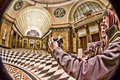
Did someone mention "overdoing" it in Topaz Adjust? :-)
 |
|
|
|
02/27/2009 04:45:14 PM · #21 |
The trial registration code given is rejected. Anyone else have the same experience? |
|
|
|
02/27/2009 04:49:06 PM · #22 |
| Mine worked like a charm. I downloaded, installed, and entered the key right after I saw your post. For the record, I put in nnn for my name and copy/pasted the code from the KEYForBetaTesting.txt file that came in the .zip. |
|
|
|
02/27/2009 04:52:47 PM · #23 |
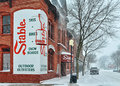
I love Topaz adjust. If you're careful with it, you can't tell it was used. I used it in this image and I'm very happy with the results. It just seems to brighten everything up. It reminds me of bringing out the shadow detail with a RAW file but this can be done with JPG's.
 |
|
|
|
02/27/2009 04:54:52 PM · #24 |
| I wonder if the fact that I am using it in PaintShop Pro could be causing the code rejection? |
|
|
|
02/27/2009 04:57:05 PM · #25 |
Originally posted by bmartuch:
If you're careful with it, you can't tell it was used. I used it in this image and I'm very happy with the results. |
I've been using the clarify adjustment in PSP for similar use. with a setting if +2 to +4 it gives an iumage some pop without any obviously fake effect. Sometimes the fake effect look good, though. Depends on the image and subject. works great on rusty old cars. |
|
Home -
Challenges -
Community -
League -
Photos -
Cameras -
Lenses -
Learn -
Help -
Terms of Use -
Privacy -
Top ^
DPChallenge, and website content and design, Copyright © 2001-2025 Challenging Technologies, LLC.
All digital photo copyrights belong to the photographers and may not be used without permission.
Current Server Time: 12/26/2025 01:25:47 AM EST.




