| Author | Thread |
|
|
02/18/2009 04:08:54 PM · #1 |
I have submitted a photo into the Gas Station challenge and in order to meet the challenge rules I downsized the image to 640x427. Once I did that the image seemed really blurry. I tried it in Corel Paint Shop Pro X2 Ultimate and Canon's DPP. I decided to just post it anyway but I've gotten a few comments mentioning the lack of sharpness (they suggested I use a tripod). I don't think I was using a tripod for that particular shot but it was properly focused before I resized it. Do you guys have any idea as to what I'm doing wrong or have any suggestions?
Thanks,
Justen |
|
|
|
02/18/2009 04:11:21 PM · #2 |
Digital images almost always require a process called Sharpening or Unsharp Mask (USM) after resizing/resampling to restore the illusion of edge detail. It is usually called a filter somewhere in your editing program.
Site Tutorial
Message edited by author 2009-02-18 16:13:54. |
|
|
|
02/18/2009 04:11:35 PM · #3 |
| It will probably be best to put this thought/thread on hold until after the challenge is over. At that point, you can post the image so we know what you're talking about and we can give appropriate advice. |
|
|
|
02/18/2009 04:50:03 PM · #4 |
| Thanks guys, I'll look at the tutorial and if that doesn't help I'll post a thread (or start this one again) in a week or so. |
|
|
|
02/26/2009 10:51:52 AM · #5 |
So, Here is the image that seems soft after resizing: //www.dpchallenge.com/image.php?IMAGE_ID=765565
I agree that it seems soft but before I resized it, it was sharp.
I looked at the tutorial but it seems that (in the skins challenge I'm trying to submit to now) the photo has a bit of a pixelation problem after I resize it. I'm working in both DPP and Corel PSP X2. I'm also locking the aspect ratio and I tried it on 72, 150, and 350 DPI.
Any suggestions as to what the problem is?
Message edited by author 2009-02-26 10:53:01. |
|
|
|
02/26/2009 10:54:33 AM · #6 |
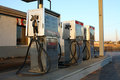
corrected link |
|
|
|
02/26/2009 11:57:32 AM · #7 |
First off, the DPI is totally irrelevant. It only matters if you are going to physically print the image.
So, I agree that it's a little soft. It looks to me like it just needs a bit of sharpening, which is quite normal for a digital image in general, and especially one resized down to 640. I don't know anything about the specific software you are using, buy I'm sure you could google up some sharpening for the web techniques specific to PSP.
The other main thing that I notice is that the file is only about 75k, and I see some compression artifacts. If PSP has a save for web function where you can tell it to optimize to file size, that's what you need to use. In other words, resize to 640, sharpen, save for web at 150k.
Hope that helps, let me know if you have any questions. |
|
|
|
02/26/2009 12:06:15 PM · #8 |
Originally posted by freakin_hilarious:
If PSP has a save for web function where you can tell it to optimize to file size, that's what you need to use. In other words, resize to 640, sharpen, save for web at 150k.
Hope that helps, let me know if you have any questions. |
Not exactly like Photoshop, but effectively does the same thing. Here's how the JPEG optimizer works in recent versions of PSP:
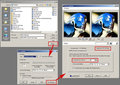
Adjust the compression value field to get the file size field as close as possible to the challenge limit. You can exclude the Exif data from the file if you need to squeeze just a little more image quality into it.
For sharpening with USM, I have been using a radius of 0.35 to 0.5, and usually a value of 150-200, depending on the image. I usually leave my clipping at 3. I will sometimes do selective sharpening in an advanced challenge, either with the sharpening brush, or by using a duplicate layer and erasing through where needed.
Message edited by author 2009-02-26 12:10:08. |
|
|
|
02/26/2009 04:11:26 PM · #9 |
Originally posted by freakin_hilarious:
First off, the DPI is totally irrelevant. It only matters if you are going to physically print the image. |
I didn't think it did. I just wanted to give you guys all the information as to what I did in the process.
I think I got it though! I didn't realize I could change how to compress the image and that's what was happening: I was compressing it way too much and reducing the quality. The uploaded image looks much better.
Thanks for all the help! |
|
Home -
Challenges -
Community -
League -
Photos -
Cameras -
Lenses -
Learn -
Help -
Terms of Use -
Privacy -
Top ^
DPChallenge, and website content and design, Copyright © 2001-2025 Challenging Technologies, LLC.
All digital photo copyrights belong to the photographers and may not be used without permission.
Current Server Time: 12/26/2025 10:47:28 AM EST.




