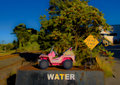
WATERby
Bear_MusicComment by Bear_Music: Originally posted by roz:
i'd really like to know how you got this fantastic look .. plug-in/filter ? .. wot ? ..:) |
The first level of it is in the RAW processing, where in the saturation field I amp *up* saturation, and take *out* clarity by moving that slider way left; vibrance is left in the middle. -80, 0, +88 are the settings. This looks like junk. Amp up contrast in RAW processor but watch for artifacts. Balance the image unnaturally flat with recovery and fill. Watch for artifacts.
Export that piece of junk (horrible looking image, truly) to CS3, then make a copy of the base layer and open Topaz Detail; Use "creative detail accent" as a starting point, use the tone sliders to work the colors where you want them, use brightness slider as needed, and process.
Dupe THAT layer and open Topaz Simplify: use the "image crispedge" setting, then dial in simplify size of around 6 or 8, and set "edge type" to "color line" and "edge strength" to around 6 or 8. Play with saturation and saturation boost to suit.
Sharpen the whole thing aggressively with adamus sharpening.
The workflow basically is to produce a soft, fuzzy, malleable, flat image in ACR then use Topaz to bring back edges and simplify masses...




 Photographer found comment helpful.