I have read a lot of tutorials on HDR and realistic HDR. In the end, the best is still from Stuck In Customs: //www.stuckincustoms.com/hdr-tutorial/
The guy has a fun style of writing that flows you naturally through the process, and he focuses on things to look for in real world situations. He especially seems to concentrate on how to make HDR photos look nice instead of "clown puke".
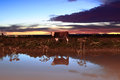
Using some of the techniques I re-learned reading this tutorial (and some others) this weekend, I came up with this shot of a mostly peaceful lake before the storm. A few days earlier and I would have posted a spectacular sunset. But the two days during this challenge saw late clouds come over and blanket the sky with grey-ness. But with HDR, I can work on overcoming the grey a bit and add some color to the sky and the scene in general.
Post Processing:
* Straighten
* Chromatic Aberration
* Retouch out a bug on the lens
* Combine 3 exposures with Nik HDR Efex Pro
* Orange coloring to add warmth
* Topaz DeNoise
* Increase Black Point
* Contrast, Definition, Saturation, and Vibrancy to all but the sky
* Decrease overall saturation but increase vibrancy
* Export as TIFF
* Resize
* Sharpen Edges
* Save as JPEG
Statistics
Place: 42 out of 65 Avg (all users): 5.7071 Avg (commenters): 7.0000 Avg (participants): 5.0357 Avg (non-participants): 5.8750 Views since voting: 683 Views during voting: 254 Votes: 140 Comments: 4 Favorites: 0






 Add photograph to your favorites
 Add photographer to your favorites


 Photographer found comment helpful.


