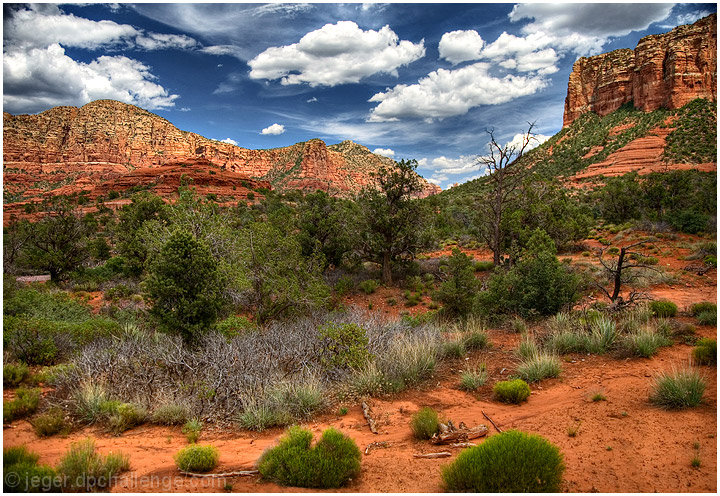
This is my first serious attempt at HDR. Since I am new to HDR, I read over Judi'stutorial, and incorporated some of her early steps in my processing, then edited using some of my own techniques.
Editing Steps:
1 - Created 9 exposures from the same image (+/- .5).
2 - Opened the images in Photomatix, adjusted the image so that it was very subtle.
3 - Import the single file into Photoshop.
4 - Minor Shadow/Highlight adjustment
5 - Clone out some wooden stakes and other minor elements in the foreground
6 - Adjustment Layer - Curves: Mask the sky
7 - Adjustment Layer - Levels (5 .95 250)
8 - Copy the green channel, change blending mode to Soft Light, Opacity 60%
9 - Copy the red channel, change blending mode to Soft Light, Opacity 60%, mask all but the sky and some trees
10 - Dodge Grass & Trees to make some stand out better (6%)
11 - Adjustment layer - Hue/Saturation - Cyan +10, Blue +10, Yellow +25, Red +5
12 - Crop to 720 wide
13 - Sharpen using my own technique based on Luko sharpening
14 - Add border
15 - Save As...
Statistics
Place: 35 out of 407 Avg (all users): 6.5496 Avg (commenters): 8.0000 Avg (participants): 6.4639 Avg (non-participants): 6.7941 Views since voting: 1371 Views during voting: 205 Votes: 131 Comments: 7 Favorites: 2 (view)






 Add photograph to your favorites
 Add photographer to your favorites


 Photographer found comment helpful.


