Example of the JPG compression adjustments in Corel PaintShop Pro.
More compression means a smaller file, but too small and you get visible compression artifacts. For Challenges, Always use the least amount of compression that will sneak your image in under the challenge limit. (Currently 300k for both basic & advanced editing.)
The example above compressed very well with a very low compression amount of 3 to get a file just under 200k. An image that is more complex and detailed might not compress as well and could require a more aggressive compression ratio.
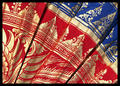
This following challenge entry, for example, had a lot of fine detail in the fabric pattern and lost some detail due to the compression needed to fit it within challenge limits.
Compression artifacts can be seen in the red areas, along the edges of the gold.




 Add photograph to your favorites
 Add photographer to your favorites