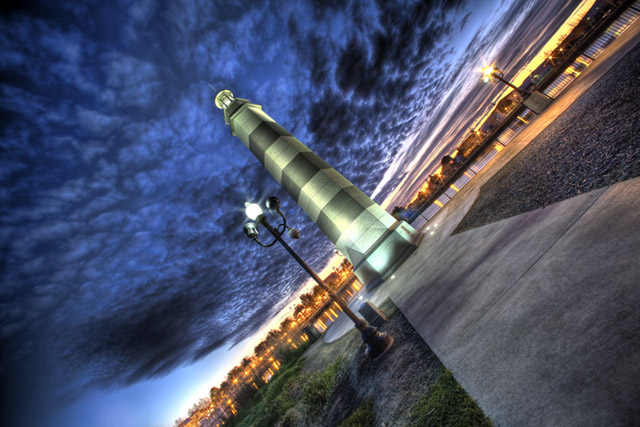
Thank you everybody for voting and great comments! I know I owe everyone explanation how did I do it. It was very tricky to do it under basic editing. I looked at DXO Optics Pro and find out that DXO has a few different ways to deal with it and make the HDR look. It was not easy for me since I do not know anything about DXO and how to use it, so I just played and worked on it over and over until I got this image. I have to say that the original looks excellent as well, but I just wanted to bring the detail and colors to stand out more. Also, I tilted the image on purpose/ Isn't the right category? If I did not tilted it would be just straight image and wouldn't fall into this category.
Imported to photoshop raw make adjustments: exposure, recovery, fill light, black, clarity and vibrance, tone curves, noise reduction save as jpg. Open in photoshop add red filter. Open again in photoshop raw make the same adjustments 2 save as jpg again. Then open in Dxo Optics Pro to make the clarity, luminance and vibrance to stand out better.
Also, I had to submit the original and adjusted image to Site Council to validate it and I had it approved.
I think this image got a lot of bad ratings for the same reasons, but I am very satisfied and I'll have millions other chances to prove I am getting better and better.
Statistics
Place: 6 out of 192 Avg (all users): 6.7424 Avg (commenters): 7.5455 Avg (participants): 6.4231 Avg (non-participants): 6.8362 Views since voting: 3931 Views during voting: 429 Votes: 229 Comments: 36 Favorites: 9 (view)
Thanks for the explanation...didn't vote but suspect you picked up a few low votes b/c of suspected rule violation. You had a very nice capture to start with and your processed entry is very vivid.
Would someone, ANYONE! please explain how this was done in Basic Editing Rules. I really like the effect and would like to use the same PP steps in some of my future work.
I can't believe this is not tonemapped etc. I loved this shot. My top pick for this challenge. I would love to here a bit more on how took this shot as well as the pp.
How did you get this HDR like effect in Basic editing ??? Stunning capture though. I hope this image meets the rules of basic editing, I give you 10 and hope this will win.
It's technically good I'm just not keen on a look that appears so artificial- to the point of looking like a computer generated scene. That said I'm impressed with the photographic skills demonstrated here.
It's a lovely picture, the sky is fantastic ... though I don't really see how tilting it has improved the photo ... maybe if the diagonal had gone from corner to corner ... or maybe I am missing something
I'd like to see this a little sharper, but it doesn't detract much from what is a beautiful composition. Great eye, and great capture of light and color. The hues on that lighthouse/statue are really unique - like a very light cobalt.






 Add photograph to your favorites
 Add photographer to your favorites


 Photographer found comment helpful.


