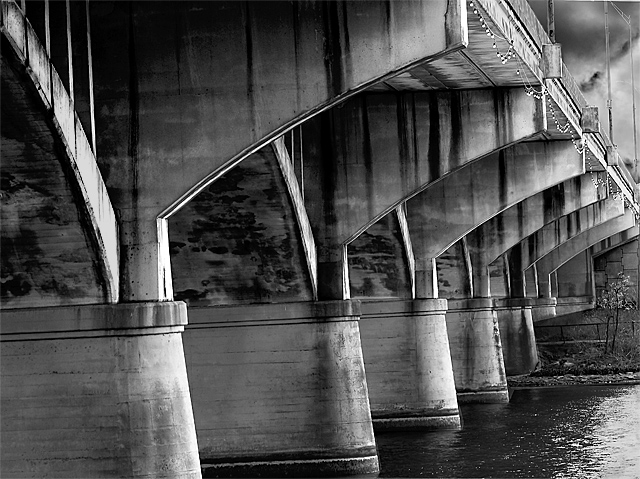
This was taken on the same day as the Previous B&W but it took me a week to figure out how I wanted to process it. The original photo had the sky blown out and some harsh bright areas in the lake. Fortunately I had taken a picture of just the sky that day and I used a section of that to fill in the blown out area and then mirrored that lightly in the water.
Convert from RAW
CS2
Neat Image
Levels
Hue/Sat do Desat photo
Back to levels to adjust color levels
Create mask for upper right corner
Paste in Coluds
Same thing for water area
Crop most of that out.
Dodge and burn and area levels adjustments
I know it sounds like a lot but many of these steps were a first for me, so it could probably be done more efficiently. Next time I am going to take several exposure bracketed shots and try HDR merge.
First the sky looks prety natural here so you've done good work and there's some nice tones in the bridge. Also,you can always use hdr from one raw, just export it in 7 steps with exposure from -3 to 3 and load it in photomatix. That's what I've done with almost every hdr I've made. You will almost always find some extra detail in that.
What a stunning bridge! We really need to have another Austing GTG. Jutilda and I have been trying to find a good weekend to get together again. I love coming to Austin to take pictures. There's so many good subjects. I've never seen the bats, but I for SURE will make that a must when its summer. About when would be the best time to go? Are there tons of people always there taking pictures or watching?
Cement/steel contrast is subtle in b&w & from the viewing distance - but each show their own distinct, beautifully lighted texture. Repeating, arched, cantilevers on the supports, receding to vanish point, modestly compressed by your 105 are made to interesting shapes. Deep dof has all the details. A noticeable tilt as mentioned. HDR, I doubt would improve this edit of tonal range. Edgy, crispy, sharpen, maybe too sharp. Good workmanship and interesting subject.
Wonderful detail and tones in the bridge! Nice use of the "added sky", too - you did a good job with the masking and pasting and stuff (which I have yet to learn). It does seem a bit tilted. In CS3 (and I suspect CS2 if I remember correctly) go to the eyedropper tool, right click, and choose the little ruler. Use the horizontal lines on the pillars as a point to "measure" with your ruler - one side of the line to the other. Go to "Rotate" and choose "Arbitrary" and it'll tell you what angle and direction it will rotate to make your line horizontal. Say OK. Then see if you like it or not, and rotate back or more as needed.
I like everything you've done with this photo. The added sky works well, and the tonal range throughout is excellent. If I were to add any criticism, it would be that it looks slightly tilted (CCW).




 Add photograph to your favorites
 Add photographer to your favorites


 Photographer found comment helpful.


