Greetings from the Critique Club!
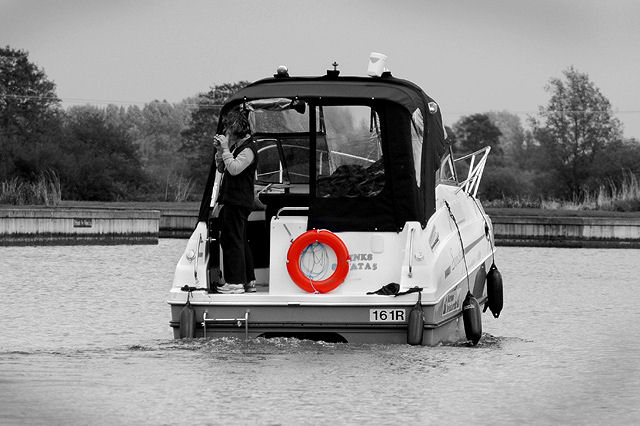
First impression: Wow, quite a red! A bit too centered, and I feel like the boat is getting lost in the background. And what is that person doing?
The photo: A bit centered for my taste. Centering the bright red life saver doesn't seem to be of any benefit to the composition. I might have tried a different angle or crop if possible. With this angle, the top of the boat also seems to get lost in the tree line. I also might have straightened out the shoreline, as it seems a bit tilted to the right.
Processing: I'm not sure I can quite follow your processing steps. It sounds like you opened two completely separate versions of this photo. I would suggest working with layers instead. You can choose a part of your photo with the lasso or wand (the life saver for example), then create a new layer which is just a copy of that. Go back to your first layer and desaturate the whole thing, and your red life saver will still be red in the other layer. There are some great PS learning threads going on right now... here is one started by  Art Roflmao... PS101 Group A - Selection Tools and Masks, and another thread from a while back from Bear_Music... Photoshop Basics Mentorship Thread. Art Roflmao... PS101 Group A - Selection Tools and Masks, and another thread from a while back from Bear_Music... Photoshop Basics Mentorship Thread.
Anyway, I got a bit off topic there, but hopefully some of that is helpful. Good luck in future challenges!
Message edited by author 2007-05-28 20:38:18. |





 Add photograph to your favorites
 Add photographer to your favorites


 Photographer found comment helpful.


