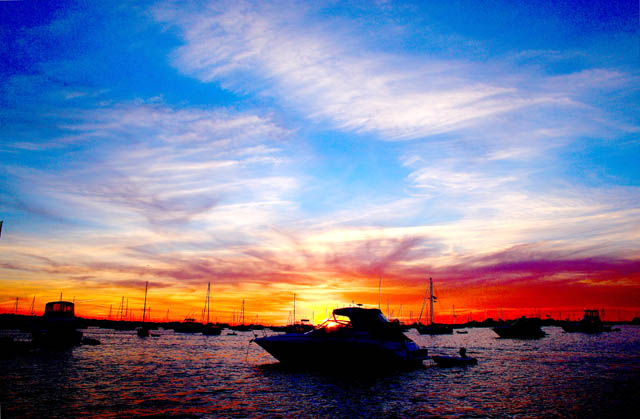
changed white balance and picture style in raw, changed brightness and sharpness, converted to jpeg. In photoshop, i changed the saturation, and levels. then, USM. went back later, and removed some dark (sensor dust?) spots. then readjusted levels to bring out the bottom of the photo.
Statistics
Place: 563 out of 684 Avg (all users): 4.9761 Avg (commenters): 5.8750 Avg (participants): 4.8629 Avg (non-participants): 5.3889 Views since voting: 984 Views during voting: 331 Votes: 251 Comments: 11 Favorites: 0
Technical: the coloring is great! the contrast is awesome...the composition is great too!!!
Creativity: it might not be the most creative image in that there are alot of boats in the water...but the awesome coloring is what makes this image rock!
Score: 10
The sky is really colorful. Love that part of it. The lower part of the image, though, is really showing a lot of artifacts, probably due to an image that started out very underexposed. Need to either try a longer shutter speed, or maybe a higher iso, though that can create artifacts too. If you have an express fix on your program, that might also create artifacts. Brightness and contrast adjustments seem to work better, along with dodging. You might also try to spot edit some of the artifacts out, or maybe apply a noise reducer to clear it up.






 Add photograph to your favorites
 Add photographer to your favorites

 Photographer found comment helpful.


