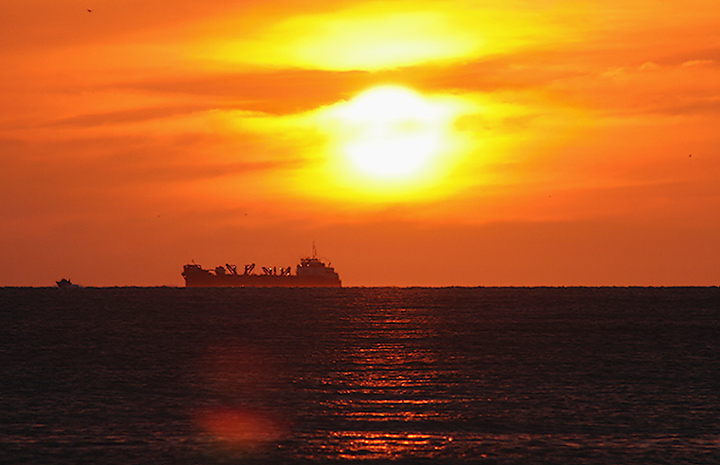
this is Roxanna Palmrose's image, reworked from a larger copy.
My specific goal was to eliminate the heavy fringing of the sun.
I could possibly have made the reds a bit more red, but the pic is VERY near channel clipping in the reds all over the place. I kinda like it like this.
Editing steps were simple, but more involved than my usual.
#1 analyze the problem - I thought it was a problem with the reds channel. That's only partly the problem. The biggest problem was weird fringing in the BLUE channel.
#2 play with selective color and hue/saturation to attempt a fix. I was not happy with this with respect to the hard edges of the fringing, but could control the intensity of the fringing.
#3 entered the channels and wrestled for a while doing stupid things on channel copies. I'm such a weirdo! :)
#4 created a second "repair" layer (normal, non-adjustment type) and went back into the channels dialogue. I went to the Blue channel where most of the problem was and played with a Gaussian Blur on the entire channel. This was highly effective at removing the edges of the fringing. 8 pixels was sufficient at the size I was dealing with.
#5 apply what I learned earlier about using selective color (hue/sat was useless for this) to control the color quality of the fringing.
#6 go back to the bottom layer and made a copy of the original blue channel. Instead of doing an extraction type selection technique, I simply created a mask by dodging the heck out of the sun areas, making sure that all of the areas immediately surrounding the fringing were 100% white, burning everything below the 'channel clipped area' to black. I LEFT the rest of the normal luminosity of the blue channel intact to allow for a softer application of the fixes. Presumably this would help with headroom if I wanted to do further adjustments on the finished product without putting it back into 'fringing'.
#7 I took this entire channel and turned it into a selection using the channels pallette. I then went to the top 'repair' layer and applied the selection as a mask. Presto Kadabra! I had the repairs I wanted in the heavy fringing area and the rest of the image was left as normal, with the detail in the boats and water untouched.
#8 resized and sharpened using some silly techniques that I've been playing with lately. There's a bird at the top left corner that I had to mask out of the sharpening.
I specifically left in the lens flare. I like lens flare for mood.




 Add photograph to your favorites
 Add photographer to your favorites

 Photographer found comment helpful.