Creating a 3D image is really quite simple. You do it in your head all the time - using two eyeballs. :-)
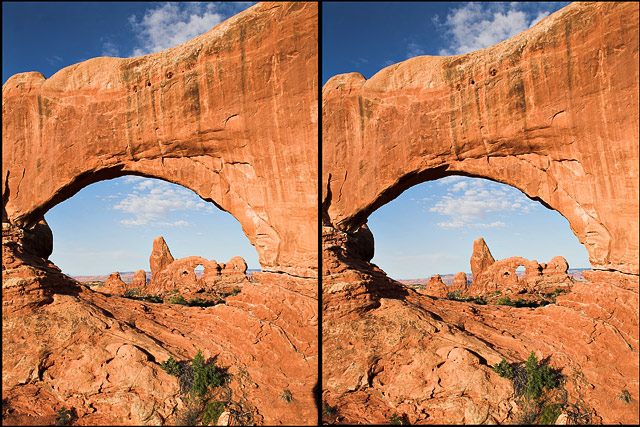
To do it with a picture, you just need to carefully take one picture (preferably in the vertical), noting what is in the frame. Then take a step to the left or right and take another picture, being careful to try to keep the same things in the frame (and don't tilt the camera). The amount you move, left or right, kind of depends on the distance to the subject. I have moved as little as two inches for a close subject, to as much as 20 feet for a distant waterfall (which is amazing because it lets you see a 3D effect thar your eyes along *cannot* see).
You can make up for the tilt and/or framing issues a little bit after the fact in Photoshop, so don't stress too much about it.
Now, in Photoshop, set up a new/blank image - let's say a 6x4 horizontal (I have a template with the black outlines already created) and copy your images into layers using Edit | Transform | Scale to size them down into the frame.
You'll want to check the image at this point - the two pictures need to be on the same side (left or right) as where they were taken, otherwise the effect will be backwards (what should be behind will feel like it needs to be in front and it'll just look wrong), but all that's left is to flatten the image and convert to jpeg.




 Add photograph to your favorites
 Add photographer to your favorites

 Photographer found comment helpful.