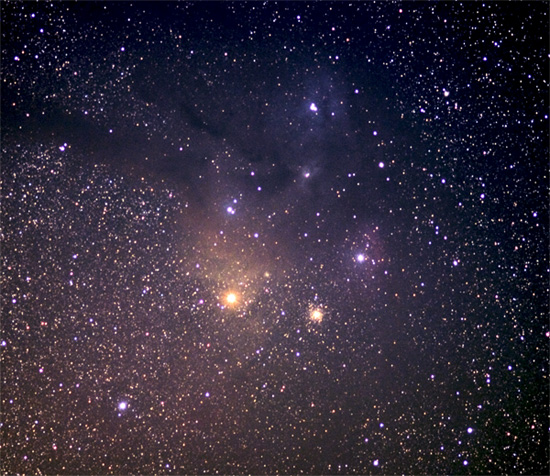
The Rho Ophiuchus Nebula region is a very colorful part of the Milkyway's outer edge. It is the triple star embedded in blue nebulosity near the top center. The bright red star just below center, and embedded in orangish nebulosity is Antares. The large globular cluster M4 is just to the right of Antares, and a smaller globular (NGC 6144) is just to the upper right of Antares. Further to the upper right of Antares is the bright star Sigma in Scorpius. It is also surrounded by a nebula. Above Antares, a number of dark nebula can been seen silhouetted against the starry background. A third globular cluster, M80, is to the right of Rho Ophiuchus.
This shot is the result of 8 exposures that were stacked using the program Registax, and then processed further in Photoshop CS2.
The camera was piggyback mounted on a Meade LX200 GPS mount.
Disqualification Details
Composites: You may not post-process your entry from or to include elements of multiple images, multiple exposures, clip art, computer-rendered images, or elements from other photographs. Please review the challenge submission rules.
Statistics
Views since voting: 1457 Comments: 12 Favorites: 0
Another great shot! I've been an astronomy buff since the late '70s - and this is a great shot considering the tough subject and tight field of view.
Too bad about the DQ, but this just adds fuel to the reasons why we need a "Space 'n Stuff" challenge. (It had to have DQ'd even before I could vote on it! I do not recall seeing this in the set, and I voted 100%.)
Advanced editing with a special rule allowing stacks. For those without a scope - any image that conveys "Space" - thinking museums, satellite tracks, star trails, Iridium flares, etc...
First off, the image is too small. Always take advantage of the full size parameters that DPC allows. Secondly, it just appears that there is a haze over the entire image. Looking through others that have posted similar photos, I see that there is a lacking clarity. For instance, consider this photo by Kirbic, . Even with over 2 minutes exposure at f/2.8, there is a beautiful clarity to the shot. Also, look at this one by strangehost, . It also possesses a clarity that this particular shot does not have. While I have no experience with photography stars and such, I would venture to guess that yours is a bit over exposed. You coverall composition is also lacking. The apparent focus of the image is the brightness that you composed in the center of the photograph. I would suggest applying the rule of thirds to add interest to this type of photography. Perhaps even upping your shadow level in Camera RAW would deepen your blacks here and give the photograph a better contrast. Even easier, use photoshop to make a curves adjustment to clean up the light haze that you have here. I copied the image, applied two curves points, one at I:174 O: 203 and a second at I:98 O:36, and this gave the image a much more dramatic feel. None of the stars were lost and the overexposure was remedied. I hope that this has been helpful and that there is some information that you can "practically apply" as you requested
Wow! I can only imagine where you were when you were able to get such an amazing shot! Somewhere far away from the city, where there is nothing to light your way but that spectacular sky!!!!! Wow again!!!






 Add photograph to your favorites
 Add photographer to your favorites

 Photographer found comment helpful.


