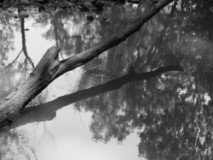
The ripple in the middle of the picture was an accident but it worked out very nicely. This is my first submission and I've never had to adjust the size of a picture (I'm learning on the fly) so I hope this doesn't come out looking like hell.
Statistics
Place: 413 out of 432 Avg (all users): 3.9107 Avg (commenters): 3.5000 Avg (participants): 3.7324 Avg (non-participants): 4.0942 Views since voting: 931 Views during voting: 390 Votes: 280 Comments: 26 Favorites: 0
You need to submit a larger photo so we can see the details. Impossible to judge photo at this size. If when you resize your photo to 640 the file size is larger than 150K which is challenge limit then adjust the jpeg quality down until you hit 150. You can do this in the save for web dialog in photoshop and I am sure other photo editors can do the same.
The image is very soft and contrast is somewhat flat. I tried a similar picture and chose not to do it for the same reason I see in this one, the additional reflection of the trees from the shore. Makes the image confusing and hard to establish a focal point.
The image is too small to be able to see the detail that I'm sure is there. Check the details for posting to the challenges, you can submit bigger pictures.
The subject lacks interest to me - (I know it's hard to make "branch" interesting) -- perhaps a color photo would have been more dramatic creating more interesting reflections. Also - a larger photo would help the viewer see what the picture is about - and could make a lot of difference.
Ths had potential. I like the one tree leaning out over the reflections of the upright trees.
You do need to make your image 640 pixels on its longest side (or close to)--this is too small to appreciate or critique proprerly.






 Add photograph to your favorites
 Add photographer to your favorites


 Photographer found comment helpful.


