| Author | Thread |
|
|
01/08/2008 01:06:30 AM · #1 |
The only problem I have with dpchallenge that is different from any other website is...
Not all of the images show up on any given window. See example below...
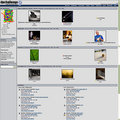
Do you have any help ideas...?
PS. I've received a couple of pointers in another thread so I'll repost those here to catch anyone who cares up to speed.
|
|
|
|
01/08/2008 01:09:56 AM · #2 |
Originally posted by Venom:
The only problem I have with dpchallenge that is different from any other website is...
Not all of the images show up on any given window. See example below...
Do you have any help ideas...?
PS. I've received a couple of pointers in another thread so I'll repost those here to catch anyone who cares up to speed. |
Once I uninstalled Norton, they all showed up, as if by magic!! :) |
|
|
|
01/08/2008 01:16:03 AM · #3 |
Originally posted by TCGuru:
Originally posted by Venom:
The only problem I have with dpchallenge that is different from any other website is...
Not all of the images show up on any given window. See example below...
Do you have any help ideas...?
PS. I've received a couple of pointers in another thread so I'll repost those here to catch anyone who cares up to speed. |
Once I uninstalled Norton, they all showed up, as if by magic!! :) |
I may have to do that because  Judi said almost the same thing here... Judi said almost the same thing here...
Originally posted by Judi:
Originally posted by Venom:
The only problem I have with dpchallenge that is different from any other website is...
Not all of the images show up on any given window. See example below...
|
You have an issue with your Nortons...there is an advanced section where you can put in //www.dpchallenge.com as an allowed site and then click on dpchallenge in the box and then click Add and a window will pop up...click on Permit and use the symbol / in the text box...then click okay. |
|
|
|
|
01/08/2008 01:20:20 AM · #4 |
Router Guy's post:Originally posted by routerguy666:
Go here and do what they suggest. It will block most of the ad whore bloat that web sites bombard you with including google analytics. |
Followed by my response to him...Originally posted by Venom:
I don't seem to be having problems with any pop-ups or adds. I'm not wanting to block anything; what I want is to somehow UNblock DPC.
Here's another example of my profile; notice my 1st, 3rd, and 5th images:

See original size here:
Original size image HERE |
|
|
|
|
01/08/2008 01:21:54 AM · #5 |
Even  smardaz had a comment: smardaz had a comment:
Originally posted by smardaz:
the only prob i have is always shows my challenge entries without their ribbons! weird, i'm gonna have to call tech support..... |
|
|
|
|
01/08/2008 01:22:16 AM · #6 |
You really have to open a second thread just to repeat everything from the first?
Dude at least try what I suggested. That damn google analytics barfs constantly and can cause strange behavior when you load a page (shit not loading, only part of the page loading, etc). Might fix it, might not, but will make your computing life better either way.
Message edited by author 2008-01-08 01:22:36. |
|
|
|
01/08/2008 01:23:27 AM · #7 |
Originally posted by Venom:
Even smardaz had a comment:
Originally posted by smardaz:
the only prob i have is always shows my challenge entries without their ribbons! weird, i'm gonna have to call tech support..... |
|
i was being a SMARDAZ (see smartass)
sorry bout that |
|
|
|
01/08/2008 01:27:47 AM · #8 |
AND FYI:
I have Norton 2004 and I'm not really able to find these settings you are talking about. I've tried checking my IE settings also. BTW, Firefox gives me the same problem so I don't think it's my internet connection. And it's not a problem with DPC because my work computer shows ALL the images with no problems.[/quote]
Originally posted by Art Roflmao:
Your Fire III submission looks awesome! I love how you got the red fireballs to shoot outside of the frame and spill out onto the rest of the web page. I'm going to hunt for it and pin a 10 on it! :D
edit: You must have the anti-Judi filter on. I think Leroy had a similar problem awhile back with the Judi-Only filter. |
Originally posted by Venom:
LOL! thanks for the laugh. I'm trying not to be anti-ANYBODY. Really Judi I'm not mad at you!
EDIT: to correct the spelling in Judi's name |
|
|
|
|
01/08/2008 01:29:34 AM · #9 |
Originally posted by routerguy666:
You really have to open a second thread just to repeat everything from the first?
Dude at least try what I suggested. That damn google analytics barfs constantly and can cause strange behavior when you load a page (shit not loading, only part of the page loading, etc). Might fix it, might not, but will make your computing life better either way. |
OK, I'll try installing it; I'm just hesitant running programs that I'm not completely sure about. Sorry for making it look like I ignored you. I really am reading that link you posted. Thanks...BB
|
|
|
|
01/08/2008 07:28:39 AM · #10 |
|
That's not a program, it's just a file that tells your computer where to look for remote sites and lies to it by telling it that IT is those remote sites. So basically a connection to google analytics is sent to your own pc where it is immediately dumped, thus freeing you from being tracked while your surf or being held hostage by any technical problems on their end which may caus eyou browsing issues. |
|
|
|
01/08/2008 07:34:42 AM · #11 |
Originally posted by routerguy666:
You really have to open a second thread just to repeat everything from the first?
Dude at least try what I suggested. That damn google analytics barfs constantly and can cause strange behavior when you load a page (shit not loading, only part of the page loading, etc). Might fix it, might not, but will make your computing life better either way. |
To be fair, you suggested a solution that isn't matching the problem he's having. The problem is the Norton Ad-Blocker.
No offense, but I would have ignored your suggestion too. It doesn't match the symptoms.
Venom: You need to set the ad-blocking portion of your Norton Anti-Spyware to allow all images from dpchallenge.com. I don't have Norton Anti-Spyware, but if you have difficulty finding the settings, post back and hopefully someone who does can help you.
~Terry
|
|
|
|
01/08/2008 07:41:05 AM · #12 |
Originally posted by ClubJuggle:
Originally posted by routerguy666:
You really have to open a second thread just to repeat everything from the first?
Dude at least try what I suggested. That damn google analytics barfs constantly and can cause strange behavior when you load a page (shit not loading, only part of the page loading, etc). Might fix it, might not, but will make your computing life better either way. |
To be fair, you suggested a solution that isn't matching the problem he's having. The problem is the Norton Ad-Blocker.
No offense, but I would have ignored your suggestion too. It doesn't match the symptoms.
Venom: You need to set the ad-blocking portion of your Norton Anti-Spyware to allow all images from dpchallenge.com. I don't have Norton Anti-Spyware, but if you have difficulty finding the settings, post back and hopefully someone who does can help you.
~Terry |
That is what I suggested to him in the other thread.....sigh!....as per below.
Originally posted by Judi:
Originally posted by Venom:
The only problem I have with dpchallenge that is different from any other website is...
Not all of the images show up on any given window. See example below...
|
You have an issue with your Nortons...there is an advanced section where you can put in //www.dpchallenge.com as an allowed site and then click on dpchallenge in the box and then click Add and a window will pop up...click on Permit and use the symbol / in the text box...then click okay. |
Message edited by author 2008-01-08 07:52:06.
|
|
|
|
01/08/2008 09:40:49 AM · #13 |
Originally posted by ClubJuggle:
Originally posted by routerguy666:
You really have to open a second thread just to repeat everything from the first?
Dude at least try what I suggested. That damn google analytics barfs constantly and can cause strange behavior when you load a page (shit not loading, only part of the page loading, etc). Might fix it, might not, but will make your computing life better either way. |
To be fair, you suggested a solution that isn't matching the problem he's having. The problem is the Norton Ad-Blocker.
No offense, but I would have ignored your suggestion too. It doesn't match the symptoms.
Venom: You need to set the ad-blocking portion of your Norton Anti-Spyware to allow all images from dpchallenge.com. I don't have Norton Anti-Spyware, but if you have difficulty finding the settings, post back and hopefully someone who does can help you.
~Terry |
How do you figure? Part of the page isn't loading and I believe I listed that as one of the symptoms my suggested cure would remedy. |
|
|
|
01/08/2008 10:57:58 AM · #14 |
Originally posted by routerguy666:
You really have to open a second thread just to repeat everything from the first? |
And "for the record"; the only reason that I started a new thread is because the first one was not mine.  Dantzr originally started it with a different question of his own. After my first comment(which included my problems) about his question, everyone was posting answers for my situation and Mikes OP got lost in translation. I'm sorry to make this look like I ignored everyone the first time but to be polite to Mike I moved on. BB Dantzr originally started it with a different question of his own. After my first comment(which included my problems) about his question, everyone was posting answers for my situation and Mikes OP got lost in translation. I'm sorry to make this look like I ignored everyone the first time but to be polite to Mike I moved on. BB
|
|
|
|
01/08/2008 10:58:10 AM · #15 |
Here are the steps and add them to pad the searchable database:
1. Go to the ad blocking and choose the 'configure' option.
2. Press the 'advanced' button to configure ad blocking for individual websites.
3. Press the 'add site' button to add 'www.dpchallenge.com' to the sites list.
4. Select 'www.dpchallenge.com' from the list and then press the 'add' button.
5. In the html string window, enter "/" without the quotation marks and select the 'permit' radio button.
6. Press OK and work your way back to the top level. |
|
|
|
01/08/2008 09:07:33 PM · #16 |
Originally posted by Brad:
Here are the steps and add them to pad the searchable database:
1. Go to the ad blocking and choose the 'configure' option.
2. Press the 'advanced' button to configure ad blocking for individual websites.
3. Press the 'add site' button to add 'www.dpchallenge.com' to the sites list.
4. Select 'www.dpchallenge.com' from the list and then press the 'add' button.
5. In the html string window, enter "/" without the quotation marks and select the 'permit' radio button.
6. Press OK and work your way back to the top level. |
YIPEE!! Step #5 is what fixed it, what a PITA! I don't even understand what the "slash" did but it corrected the problem. Thanks everyone for your input and help. BB
|
|
|
|
01/08/2008 09:27:48 PM · #17 |
Originally posted by Venom:
Originally posted by Brad:
Here are the steps and add them to pad the searchable database:
1. Go to the ad blocking and choose the 'configure' option.
2. Press the 'advanced' button to configure ad blocking for individual websites.
3. Press the 'add site' button to add 'www.dpchallenge.com' to the sites list.
4. Select 'www.dpchallenge.com' from the list and then press the 'add' button.
5. In the html string window, enter "/" without the quotation marks and select the 'permit' radio button.
6. Press OK and work your way back to the top level. |
YIPEE!! Step #5 is what fixed it, what a PITA! I don't even understand what the "slash" did but it corrected the problem. Thanks everyone for your input and help. BB |
Arrrggghhhh...why do I feel like my posts are being ignored?
|
|
|
|
01/08/2008 09:58:03 PM · #18 |
Originally posted by Judi:
That is what I suggested to him in the other thread.....sigh!....as per below.
Originally posted by Venom:
The only problem I have with dpchallenge that is different from any other website is...
Not all of the images show up on any given window. See example below...
|
You have an issue with your Nortons...there is an advanced section where you can put in //www.dpchallenge.com as an allowed site and then click on dpchallenge in the box and then click Add and a window will pop up...click on Permit and use the symbol / in the text box...then click okay. |
Originally posted by Judi:
Arrrggghhhh...why do I feel like my posts are being ignored? |
Not at all. I was just having issues finding the "Advanced section". I didn't find it until tonight.
Message edited by author 2008-01-08 22:10:56.
|
|
Home -
Challenges -
Community -
League -
Photos -
Cameras -
Lenses -
Learn -
Help -
Terms of Use -
Privacy -
Top ^
DPChallenge, and website content and design, Copyright © 2001-2026 Challenging Technologies, LLC.
All digital photo copyrights belong to the photographers and may not be used without permission.
Current Server Time: 05/13/2026 07:53:03 PM EDT.




