| Author | Thread |
|
|
09/10/2007 02:05:48 AM · #1 |
Someone told me about this a few days ago...
Wire Pilot is photo retouching software specially designed for wire removal. The software allows you to retouch wires, posts, antennas and other unwanted linear objects from a photo.
Did I mention that it is free? It comes as a stand-alone utility or a plug-in for Photoshop, Photoshop Elements 4, Jasc Paint Shop Pro, Corel PHOTO-PAINT, Macromedia Fireworks, XnView.
//www.colorpilot.com/wire.html
|
|
|
|
09/10/2007 03:27:22 AM · #2 |
I'm going to give this a try; thanks for link!
Best,
RobH |
|
|
|
09/10/2007 08:55:58 AM · #3 |
I have downloaded this and given it a try on this shot:
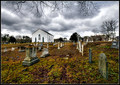 
In one sense it's pretty effective; it's simplicity itself to use, and it's a one-click-per-area operation. However, it has a couple of problems:
1. You can't drag while doing it, so you have to use multiple clicks down the length of long wires, a PITA. Compare to CS2's healing brush tools, where you can track the length of the wire in a single pass.
2. It reproduces tonality but not texture/grain, so to the critical eye there's a ghost of the original wire, expressed as an unnaturally smooth, smudged line. The healing brush tool can avoid this problem if it is used correctly.
(Admittedly, the example above is done for speed, with no attempt, for example, to fine-tune the corrective circle to a size nearly identical with the wire diameter, but if you magnify the above image a little you can clearly see the "smudge" result in the sky area, and how it is absolutely unacceptable where the wires overlay the church clapboards...)
I suspect this could be a go-to tool for issues such as wires, light stands etc against completely smooth backgrounds (plain studio backdrops, blue skies, etc), but for objects against complex BGs it's not a good solution at all.
R.
Message edited by author 2007-09-10 09:03:32.
|
|
|
|
09/10/2007 11:43:21 AM · #4 |
Yeah, I see what you mean, Robert. I, personally, haven't tried it but it seems that Photoshop's Clone tool would work better than this tool (at least in your example).
|
|
|
|
09/10/2007 12:12:24 PM · #5 |
Originally posted by AperturePriority:
Yeah, I see what you mean, Robert. I, personally, haven't tried it but it seems that Photoshop's Clone tool would work better than this tool (at least in your example). |
This is actually more analogous to PS "spot healing brush" tool, in that you don't select an area to "copy"; rather, the tool reads neighboring areas and adjusts to compensate. Hence, no texture carried over. PS "healing brush", on the other hand, allows you to select a neighboring area and use it in various modes, including copy; the nice thing is the selection point follows as you move the tool, so if yous et things up right it's very precise as far as reproducing texture, luminance, AND detail all at the same time.
I am SURE the reason they are giving this away free is that its function is already native to Photoshop anyway.
R.
|
|
|
|
09/10/2007 12:23:59 PM · #6 |
|
I guess im missing the idea, cause I still see the wires in both images you posted? Or is that the conclusion? |
|
|
|
09/10/2007 01:26:07 PM · #7 |
|
Stick with photoshop tools, they do a better job than the example of Robert's. |
|
|
|
09/10/2007 02:46:28 PM · #8 |
|
Clone tool has never been a problem for me. I guess I don't see a need for this? |
|
Home -
Challenges -
Community -
League -
Photos -
Cameras -
Lenses -
Learn -
Help -
Terms of Use -
Privacy -
Top ^
DPChallenge, and website content and design, Copyright © 2001-2026 Challenging Technologies, LLC.
All digital photo copyrights belong to the photographers and may not be used without permission.
Current Server Time: 05/15/2026 06:03:11 PM EDT.




