| Author | Thread |
|
|
06/24/2010 03:31:41 PM · #1 |
Hey everyone. I was just looking for some peoples opinions on an edit I have done for a friend before I take it back to them. Would rather embaress myself here than in front of them if they think its awful.
I have a mate who took some shots on a trip to Everest & I have said I will clean a few of them up. One of them he really likes which is this - 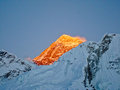 (taken with a point n shoot Sony dsc-w80) (taken with a point n shoot Sony dsc-w80)
Now I have got a trial version of CS5 (as an aside I am loving that a lot) so I could get the jpg into camera RAW & play with it a bit (i usually use cs2 so couldnt do that) and have so far edited it to this - 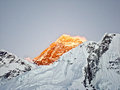
I would just like people opinions on whether this looks good, I like it. I used the HDR merge in CS5 & am clearing up small artifacts from the shot itself as there are a lot. I have also smoothed the sky a bit to help with that. Before I go any further I just wanted advice from people if I have missed something obvious to change, or if you guys think the edit so far sucks...
I am wondering if the sky should be darker/ bluer for a start. all cc appreciated
Im a big girl, I can take it!! |
|
|
|
06/24/2010 03:40:02 PM · #2 |
|
i think it might be cool if you could keep the sky blue. . it would contrast nicely with the warm tones on the mountain |
|
|
|
06/24/2010 04:34:48 PM · #3 |
|
i like what you've done so far but i agree with karmat ... i think the darker blue sky would really work well here. |
|
|
|
06/24/2010 04:38:12 PM · #4 |
Is that the real color of the mountian? Is it the sun?
Also, I know you can't do nothing about it now but the shot would really be nice if it had something in it for "scale" ! |
|
|
|
06/24/2010 04:47:12 PM · #5 |
Had a quick go at it in Lightroom, you need to have a go at the noise in the sky, but it is getting there:
 |
|
|
|
06/24/2010 05:12:10 PM · #6 |
How's this? Just some neat image, and dividing the picture into two zones, sky and other. Take some of the blue and cyan out of the fore, leave it in the sky. Adjust relative saturation and brightness of red and yellow. Do some curves work for more contrast in foreground. Add a little sky gradient and a hint of foreground gradient.
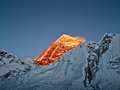
I think it's a total mistake to take the blue out of the foreground utterly; it is natural, it's the way we see it in reality. At that high altitude, the only light in shadowed areas is intensely blue reflected light from the sky.
R.
Message edited by author 2010-06-24 17:12:46.
|
|
|
|
06/24/2010 05:19:13 PM · #7 |
I was writing while Bear was posting ... :-(
I would make separate masks for the sky and the two "colors" of mountains, and make color/tone adjustments to each area separately. I use Curves almost exclusively, but the choice of tool is less important than controlling the area to which it's applied.
You can get that color effect when the back peak is enough higher than the foreground mountains to catch the setting sun, while the latter peaks are shaded. |
|
|
|
06/24/2010 05:23:39 PM · #8 |
Originally posted by GeneralE:
I was writing while Bear was posting ... :-(
I would make separate masks for the sky and the two "colors" of mountains, and make color/tone adjustments to each area separately. I use Curves almost exclusively, but the choice of tool is less important than controlling the area to which it's applied. |
Sorry about that :-(
In this case two areas were sufficient, as the foreground and Everest itself have no colors in common, so a single mask in hue/sat allowed adjusting the blue/cyan of the foreground and the red/yellow of Everest independently. As it happens, the same set of contrast curves worked on both also.
R.
|
|
|
|
06/24/2010 05:45:43 PM · #9 |
Originally posted by Bear_Music:
As it happens, the same set of contrast curves worked on both also.
R. |
Yeah, I saw that. Though I'd be tempted to make the separate FG and Sky masks to have the option to use different adjustments, even if slight. At least the way it looks on my monitor, I'd have made the snow somewhat lighter than you have it. |
|
|
|
06/24/2010 05:54:01 PM · #10 |
Originally posted by kenskid:
Is that the real color of the mountian? Is it the sun?.. |
Yes its the sun making it that colour. Unfortunatly I wasnt there so I am flying slightly blind.
Thanks everyone for the comments & edits so far. I have much to learn with using PS so the advice is much appreciated. Thanks Bear & GeneralE I will give your suggestions a go tomorrow. I have already saved a sky selection so least I can get my mask fairly quickly!
I shall report back on progress! |
|
|
|
06/24/2010 10:25:32 PM · #11 |

This was my go at it.
I didnt use PS I used paintshop -
I selected the sky - did a manual color correction and pulled a lil bit of the blue but not a lot ...
Then did the same with the mountians except I pulled a bit more of the blue.
Then I increased contrast and brightness
Removed dust spot
removed digital noise
saved.
|
|
|
|
06/24/2010 10:30:36 PM · #12 |
Originally posted by GeneralE:
Yeah, I saw that. Though I'd be tempted to make the separate FG and Sky masks to have the option to use different adjustments, even if slight. At least the way it looks on my monitor, I'd have made the snow somewhat lighter than you have it. |
Lightening the foreground was done by changing the luminance of the blues and cyans, didn't need another channel for that :-) Very nifty stuff, that hue/sat adjustment layer.
Most of the images I'm seeing here are lightening the foreground too much IMO, there's no reason to do it (the peak is the subject) and it looks unnatural to me. But then, I've spent a lot of time in snowy mountains :-)
R.
|
|
Home -
Challenges -
Community -
League -
Photos -
Cameras -
Lenses -
Learn -
Help -
Terms of Use -
Privacy -
Top ^
DPChallenge, and website content and design, Copyright © 2001-2026 Challenging Technologies, LLC.
All digital photo copyrights belong to the photographers and may not be used without permission.
Current Server Time: 08/01/2026 07:24:37 PM EDT.




