| Author | Thread |
|
|
01/12/2010 02:40:40 PM · #1 |
I posed this question Sunday night in a thread but got no response, probably because of the time I sent it. So I will post it again here, but I also would like to know how I should have my color settings set up in general. So i suppose I will ask this in two parts. First from the original thread.
1) I need to prepare some images for a magazine but am not sure how to have my color settings set in CS4. I am looking to see if I should set my color settings to "North American PrePress 2" work in RGB mode and then convert to CMYK at the end as I save the image as a 16 bit Tiff file. Is this correct? Any advice would be great. The only requirements I was given was for the image to be in CMYK and set to 300 DPI. No icc profile was given. Any advice would be appreciated.
I ended up using the North American PrePress 2 setting and think it should work well, but was curious if there was a better option I could have used.
2) I am currently working on getting many of my images prepared for prints and am trying to keep things accurate. Currently I am converting RAW files to Profoto RGB and saving the images as 16 bit tiffs. My old workflow was to just wing the edits down to Web size, or save .psd files at DPC sized entries so I remembered what I did. Now this is coming back to bite me in the ass as I have to redo so many photos! Also I am now using CS4 instead of CS2 and can't remember how I had everything color managed on my old computer. Below is my current Color Settings, just looking to see if this is how it should be or if I should make adjustments. I have my proof settings set to Monitor RGB. My monitor is calibrated. I am planning to use some online service, yet to be determined to have my prints done, so trying to keep the largest amount of data available to me.
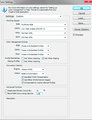
Thanks for any advice.
Joe
|
|
|
|
01/12/2010 02:50:15 PM · #2 |
May be This link will help you. This one also explains lots of things about color management.
Message edited by author 2010-01-12 15:03:36. |
|
|
|
01/12/2010 03:20:59 PM · #3 |
Originally posted by ikopanas:
May be This link will help you. This one also explains lots of things about color management. |
Thank you for that link.
It seems then I should stick with North American Prepress 2? Although I would then be working in adobe 1998 and not profoto as my icc profile/working space and stick to Monitor RGB as my proof. Is this how you are set up?
|
|
|
|
01/12/2010 03:38:03 PM · #4 |
| Why would Monitor RGB be your proof? |
|
|
|
01/12/2010 03:50:21 PM · #5 |
Originally posted by cpanaioti:
Why would Monitor RGB be your proof? |
I don't know. I don't really know what I am doing. :P What should it be?
|
|
|
|
01/12/2010 04:28:38 PM · #6 |
The bottom line is, color management is a complex topic. If you really need to understand it, get a good book and spend the time. Otherwise, keep your workflow in sRGB, and let the folks doing the pre-press work do the conversion. Proper settings for conversion to CMYK for pre-press are dependent on the specific printing process in use.
ETA:
//www.amazon.com/World-Color-Management-Bruce-Fraser/dp/0201773406
Message edited by author 2010-01-12 16:30:43. |
|
|
|
01/12/2010 04:49:26 PM · #7 |
Originally posted by kirbic:
The bottom line is, color management is a complex topic. If you really need to understand it, get a good book and spend the time. Otherwise, keep your workflow in sRGB, and let the folks doing the pre-press work do the conversion. Proper settings for conversion to CMYK for pre-press are dependent on the specific printing process in use.
ETA:
//www.amazon.com/World-Color-Management-Bruce-Fraser/dp/0201773406 |
Thanks Fritz for the link. Basically that is what I did for the images sent to the magazine printers. I think at this point I would just like to get a set up where I could send my images to print at mpix or some online printing service( this thread will come soon enough :P) and know what is going to come in my mailbox.
I thought ProFoto was the way to go until the last second then convert to sRGB or whatever profile is necessary for a print. But now I am not sure how to set up my softproof.workspace scenario. Just looking for some standard. :)
Message edited by author 2010-01-12 16:51:33.
|
|
Home -
Challenges -
Community -
League -
Photos -
Cameras -
Lenses -
Learn -
Help -
Terms of Use -
Privacy -
Top ^
DPChallenge, and website content and design, Copyright © 2001-2025 Challenging Technologies, LLC.
All digital photo copyrights belong to the photographers and may not be used without permission.
Current Server Time: 12/25/2025 09:23:08 AM EST.




