| Author | Thread |
|
|
07/04/2009 02:19:39 AM · #1 |
| I want to make my logo with a wacom tablet. Basically, I'm going with my initials as I write them myself. Similar to what I have now, just my own handwriting instead of an actual font. So, I opened a new document in Photoshop, used the brush tool and drew my initials. Cool. Now I want to add an inner shadow to the initials. It wont work though. Anyone know how to make that happen? |
|
|
|
07/04/2009 12:56:27 PM · #2 |
Right click on the type layer in the layers palette and choose "rasterize type." Then you should be able to add a drop shadow.
|
|
|
|
07/04/2009 01:10:43 PM · #3 |
Originally posted by mk:
Right click on the type layer in the layers palette and choose "rasterize type." Then you should be able to add a drop shadow. |
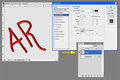
It's not text - she said she used the brush tool. Also, you can use layer styles (inner shadow) on unrasterized text layers.
Rompy - make sure you have the initials on a layer with NO background color (and not on the background layer)
 |
|
|
|
07/04/2009 01:23:23 PM · #4 |
Oh, I'm supposed to read stuff before I reply? Well, shoot. Forget that.
|
|
|
|
07/04/2009 02:05:50 PM · #5 |
Originally posted by mk:
Oh, I'm supposed to read stuff before I reply? Well, shoot. Forget that. |
Sometimes it matters. Sometimes it doesn't. ;-) |
|
|
|
07/05/2009 10:48:45 AM · #6 |
|
Home -
Challenges -
Community -
League -
Photos -
Cameras -
Lenses -
Learn -
Help -
Terms of Use -
Privacy -
Top ^
DPChallenge, and website content and design, Copyright © 2001-2025 Challenging Technologies, LLC.
All digital photo copyrights belong to the photographers and may not be used without permission.
Current Server Time: 12/25/2025 11:46:02 PM EST.




