| Author | Thread |
|
|
06/12/2009 08:16:16 PM · #1 |
I wonder if anybody has come up with a good way to remove the really low frequency noise seen from doing long nighttime exposures. Here's a good example:
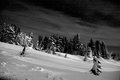
This is the red channel of a shot I did a while back. I've tried Neat Image, but often the required strength is so high it degrades the rest of the image too much.
Anybody have any successful tips for dealing with this? |
|
|
|
06/12/2009 09:35:50 PM · #2 |
The first thing to do is to avoid as much as possible of the noise. Follow these guidelines:
- Shoot RAW and expose to the right
- Shoot dark frames, preferably several. Average the dark frames and subtract the averaged dark frame from the image. That will eliminate as much of the pattern noise as is feasible. Alternatively turn on long-exposure noise reduction (it uses only one dark frame, but is pretty effective)
- If the scene permits, *do* shoot and stack multiple images. Random noise (noise that does not appear in a fixed pattern) is reduced by the square root of the number of frames stacked, e.g. 4 frames, half the noise.
If you need to remove this kind of noise in an existing exposure, try this:
1.) Create a mask with just the darker and less detailed areas of the noisy channel unmasked
2.) Feather the mask somewhat
3.) Apply Gaussian blur to the unmasked area
The blurring of one of the color channels will have noticeable effect only if there were strong, sharp edges of that color in the image, and those should have been masked off and thus not blurred. Detail will be rendered by the remaining two channels, including enough noise to hide the unnatural smoothness of the blurred channel. This technique takes a little work to perfect, but can yield very good results. |
|
|
|
06/12/2009 11:27:25 PM · #3 |
Geeze, that's a wildly informative post, professor Kirbic!
R. |
|
|
|
06/12/2009 11:35:11 PM · #4 |
Originally posted by kirbic:
- Shoot dark frames, preferably several. Average the dark frames and subtract the averaged dark frame from the image. That will eliminate as much of the pattern noise as is feasible.
|
Okay, I'm a Photoshop idiot. I know it's asking a lot, but would it be possible to get detailed instructions? I don't know how to "subtract the averaged dark frame from the image" (or how to subtract anything else, for that matter). Thanks :) |
|
|
|
06/13/2009 12:08:01 AM · #5 |
Thanks Fritz! I've been actually doing some of what you posted. I believe the long-exposure noise reduction was on, although I can't promise. I know it was on for part of that evening, but this was two years ago. I've tried applying a gaussian on the red channel and that got me somewhere, but what I wind up having to do is masking off where the stars are. I think this tends to make them colored as well as they now miss red which doesn't make for a white star.
I should try to averaging although I also don't know how to subtract that from an actual picture. |
|
|
|
06/13/2009 12:56:30 AM · #6 |
|
|
|
06/13/2009 07:47:36 AM · #7 |
For those who asked, manually subtracting a dark frame can be done thusly:
1.) Create the dark frame. Take a photo with lens cap on, same exposure settings as the image it will be subtracted from. If shooting RAW, only ISO & shutter speed matter. If shooting JPEG, *all* camera setings that affect the final image need to be the same.
2.) Convert the dark frame and image. When converting from RAW, all of the same conversion settings need to be applied to both the image and dark frame. If shooting JPEG, you'll be skipping this step.
3.) Subtract dark frame. DO this before any editing or adjustments of the image.
3a.) Load the image
3b.) Load the dark frame as a layer on top of the image
3c.) Set the layer blend mode on the dark frame to "difference"
3d.) Flatten image
3e.) Done
With all that said, this will have the same effect as turning on long exposure noise reduction. It just gives you additional flexibility in when you shoot your dark frame(s) and allows you to use multiple averaged dark frames if desired. See below for technique to average several images:
1.) Acquire images. Use same exposure settings for all
1a) If shooting RAW, convert all using same conversion settings.
2.) Load images as layers in a single Ps file
3.) Set opacity of base layer to 1/1 = 100%, layer 2 to 1/2 = 50%, layer 3 to 1/3 = 33%, and so on
4.) Flatten image |
|
|
|
06/13/2009 11:16:49 AM · #8 |
Is pattern noise(ie noise coming from the sensor, not from lack of enough photons) consistent over the life of the sensor, or does it vary according to other circumstances like temperature etc?
Can you just take one set of dark frame images and average them to provide a map of sensor noise and use them with all photos taken with the camera? Or is it better to do it for each shoot? |
|
|
|
06/13/2009 12:04:52 PM · #9 |
| It would seem you need to do it for each shoot -- note the mention of the dark frames being shot with the same settings as the photo you are trying to fix. This is fixing random noise, not dead or hot pixels, which would be more consistent. |
|
|
|
06/13/2009 01:28:35 PM · #10 |
| Kirbic, thank you so much; your instructions are exactly what I needed. So often I see mention of techniques that I know WHAT they do but not HOW, and I usually don't ask. |
|
|
|
06/13/2009 01:36:29 PM · #11 |
Originally posted by kirbic:
For those who asked ... |
Originally posted by BeeCee:
Kirbic, thank you so much; your instructions are exactly what I needed. So often I see mention of techniques that I know WHAT they do but not HOW, and I usually don't ask. |
Now, if you could send a few screenshots to Langdon, he can post it in the Tutorials section so it won't be lost in the Forum archives ... |
|
|
|
06/13/2009 02:20:05 PM · #12 |
Originally posted by GeneralE:
Originally posted by kirbic:
For those who asked ... |
Originally posted by BeeCee:
Kirbic, thank you so much; your instructions are exactly what I needed. So often I see mention of techniques that I know WHAT they do but not HOW, and I usually don't ask. |
Now, if you could send a few screenshots to Langdon, he can post it in the Tutorials section so it won't be lost in the Forum archives ... |
YES!
I have a file of bookmarks for all these hints because I can never remember them unless/until I'm using them regularly. The one-liners I cut and paste into a notepad. But it would be sooooooooo much nicer to have them in tutorials!
|
|
Home -
Challenges -
Community -
League -
Photos -
Cameras -
Lenses -
Learn -
Help -
Terms of Use -
Privacy -
Top ^
DPChallenge, and website content and design, Copyright © 2001-2025 Challenging Technologies, LLC.
All digital photo copyrights belong to the photographers and may not be used without permission.
Current Server Time: 12/26/2025 01:24:30 AM EST.




