| Author | Thread |
|
|
05/01/2009 10:23:48 PM · #1 |
hey, need some advice on new blue screen problems i have. stop number is 0x000000050. the computer opens and everything, but as soon as i open the interenet it crashes. i ran avast! but only found a few files of unreadable files which i deleted.
any advice? |
|
|
|
05/01/2009 10:31:10 PM · #2 |
By "unreadable" I hope you don't mean unable to scan.
Message edited by author 2009-05-01 22:32:25. |
|
|
|
05/01/2009 10:31:49 PM · #3 |
Originally posted by spiritualspatula:
By "undreadable" I hope you don't mean unable to scan. |
mmmmm im guessing i should be worried |
|
|
|
05/01/2009 10:33:45 PM · #4 |
The reason why I ask is there are often system files or similar that are unable to be scanned by avast. This is normal and they do not constitute a threat, but they are literally unable to be scanned because avast! isn't given access. By deleting them.....
Do you have a recent restore point to go off of? |
|
|
|
05/01/2009 10:35:35 PM · #5 |
| well i looked through the files before deleting, so there wasnt anything important i deleted. i kept 4 of maybe the 20 files |
|
|
|
05/01/2009 10:47:27 PM · #6 |
This error is caused by damaged or faulty drivers for some hardware, it can also be caused by faulty ram but from your discription it sounds like a Lan driver issue. Quickest way to get past it is as has been suggested is to do a system restore, "start" "programs" "accessories" "system tools" "system restore. Select a date well before the problem started.
Failing that get it to a computer repair shop or you will go insane. I see lots of people bringing in computers to my shop all worked up ready to explode, it is not worth it. |
|
|
|
05/01/2009 10:52:19 PM · #7 |
| im using a PC, i dont have a programs file at the start menu |
|
|
|
05/01/2009 10:57:52 PM · #8 |
Originally posted by JDubsgirl:
im using a PC, I dont have a programs file at the start menu |
I think he meant to say "all programs".
Have you booted into safe mode with network? If it runs ok in that mode, then it is almost certainly a driver problen as previously suggested.
It might be time for the scorched earth approach. You may need to back up your data and reinstall the OS. (BTW, even a Mac needs this now and then)
Message edited by author 2009-05-01 22:59:49. |
|
|
|
05/01/2009 11:12:29 PM · #9 |
Originally posted by Yo_Spiff:
(BTW, even a Mac needs this now and then) |
BLASPHEMY! |
|
|
|
05/01/2009 11:21:47 PM · #10 |
Originally posted by Yo_Spiff:
Originally posted by JDubsgirl:
im using a PC, I dont have a programs file at the start menu |
I think he meant to say "all programs".
Have you booted into safe mode with network? If it runs ok in that mode, then it is almost certainly a driver problen as previously suggested.
It might be time for the scorched earth approach. You may need to back up your data and reinstall the OS. (BTW, even a Mac needs this now and then) |
i dont have all programs either. am i just missing something or what |
|
|
|
05/01/2009 11:40:43 PM · #11 |
You are missing something. "All programs" should be listed on your start menu. It is where you can find all the stuff that is not pinned to the menu, on the desktop, or in the recently used apps section of the start menu.
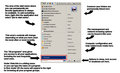
I'm using Vista, so the behavior and look of my start menu is slightly different, but you should have this same option in roughly the same place in XP. (except that I keep my taskbar at the top of the screen)
Message edited by author 2009-05-01 23:41:22. |
|
|
|
05/01/2009 11:43:19 PM · #12 |
| I think she should just put up a screenshot herself so we see exactly what her options are. She's a Vista user I think, assuming she's using the new laptop. |
|
|
|
05/01/2009 11:47:57 PM · #13 |
Originally posted by spiritualspatula:
I think she should just put up a screenshot herself so we see exactly what her options are. She's a Vista user I think, assuming she's using the new laptop. |
im on the laptop now, its the desktop thats broken. and yeh i found all prgrams. i was looking everywhere but at the left hand lover corner lol |
|
|
|
05/01/2009 11:57:00 PM · #14 |
| ok looks like its runnings smooth now. thanks guys |
|
|
|
05/02/2009 12:18:51 AM · #15 |
| I got carried away and turned my screenshot into "Start menu 101". |
|
|
|
05/02/2009 12:22:06 AM · #16 |
Originally posted by Yo_Spiff:
I got carried away and turned my screenshot into "Start menu 101". |
bahaha no worries:) |
|
|
|
05/02/2009 07:03:26 PM · #17 |
| Blue Screen of Death Survival Guide from the Über-geeks at Maximum PC magazine. |
|
Home -
Challenges -
Community -
League -
Photos -
Cameras -
Lenses -
Learn -
Help -
Terms of Use -
Privacy -
Top ^
DPChallenge, and website content and design, Copyright © 2001-2026 Challenging Technologies, LLC.
All digital photo copyrights belong to the photographers and may not be used without permission.
Current Server Time: 05/10/2026 04:57:28 PM EDT.




