| Author | Thread |
|
|
01/21/2009 07:56:44 PM · #1 |
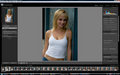
So I just installed Lightroom, and to my dismay there's something up with the color. Everything I look at in the filmstrip looks awful, posterized, etc, with comparison to Bridge, which makes the shots look, well, as they actually are.
For comparison, Lightroom:
And the same in Bridge:
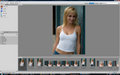
Anyone know how to fix this?
|
|
|
|
01/21/2009 08:01:21 PM · #2 |
| Can't see much of a diff at these sizes, but you can see lr is using 'default' develop settings. You can tinker with them and save a new default that closer resembles bridge. You can also download camera profiles for use in lr that work pretty well at approximating camera preview settings. |
|
|
|
01/21/2009 08:05:51 PM · #3 |
The pics are bigger than that--click 'view full-sized image' to see the whole thing.
Just noticed the same thing happens if I open these RAW files in Photoshop's camera RAW, but not if I open in Bridge's camera RAW...
|
|
|
|
01/21/2009 08:10:54 PM · #4 |
| I see. Go to Develop in lr, change the settings and save a new default. I set everything to 0 and use that as a default. |
|
|
|
01/21/2009 08:15:30 PM · #5 |
I've tried that, but it didn't change the uneven transitions of tone I'm getting. Any other ideas? It can't be a color space issue, can it? RAW doesn't record color spaces...
|
|
|
|
01/21/2009 08:19:20 PM · #6 |
You know what it looks like? It looks kinda like these programs aren't taking the entire bitrate of the file--looks like if I had set the graphics card to 16-bit color instead of 32-bit. But only in these programs. hmmmmm....
|
|
|
|
01/21/2009 08:41:06 PM · #7 |
Phew. Figured it out. I'm working on a new monitor, which uses its own color profile. I went into color management and changed its default profile to sRGB, all fixed.
|
|
Home -
Challenges -
Community -
League -
Photos -
Cameras -
Lenses -
Learn -
Help -
Terms of Use -
Privacy -
Top ^
DPChallenge, and website content and design, Copyright © 2001-2026 Challenging Technologies, LLC.
All digital photo copyrights belong to the photographers and may not be used without permission.
Current Server Time: 05/11/2026 09:50:50 AM EDT.




