| Author | Thread |
|
|
12/29/2008 09:59:37 AM · #1 |
| Anyone know why i am changing the b/g color to white but when i increase canvas size to make a border it keeps coming up black?! (PS CS3) |
|
|
|
12/29/2008 10:03:09 AM · #2 |
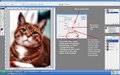
| When you're changing the canvas size there is a drop down box at the bottom of the dialogue box "canvas extension colour", make sure you are selecting the background colour in there (or the colour you want) as it overrides your background colour if you don't. |
|
|
|
12/29/2008 10:07:03 AM · #3 |
Originally posted by Covert_Oddity:
When you're changing the canvas size there is a drop down box at the bottom of the dialogue box "canvas extension colour", make sure you are selecting the background colour in there (or the colour you want) as it overrides your background colour if you don't. |
ahhhhhh thanks so much! you're my favorite user with the name covert_oddity! |
|
|
|
12/29/2008 10:09:46 AM · #4 |
Originally posted by smardaz:
Originally posted by Covert_Oddity:
When you're changing the canvas size there is a drop down box at the bottom of the dialogue box "canvas extension colour", make sure you are selecting the background colour in there (or the colour you want) as it overrides your background colour if you don't. |
ahhhhhh thanks so much! you're my favorite user with the name covert_oddity! |
Aww, now I just feel special! |
|
|
|
12/29/2008 10:29:28 AM · #5 |
|
|
|
12/29/2008 12:14:45 PM · #6 |
| Bear I see you are having fun with that Greenshot program |
|
|
|
12/30/2008 10:50:23 AM · #7 |
Originally posted by dassilem:
Bear I see you are having fun with that Greenshot program |
Yup :-)
R.
|
|
|
|
12/30/2008 11:17:13 AM · #8 |
Hey...that cat owes me money.
Originally posted by Bear_Music:
 |
|
|
Home -
Challenges -
Community -
League -
Photos -
Cameras -
Lenses -
Learn -
Help -
Terms of Use -
Privacy -
Top ^
DPChallenge, and website content and design, Copyright © 2001-2025 Challenging Technologies, LLC.
All digital photo copyrights belong to the photographers and may not be used without permission.
Current Server Time: 12/26/2025 05:45:35 PM EST.




