| Author | Thread |
|
|
11/28/2008 12:41:44 PM · #1 |
| I have a new monitor, this monitor have two possible image ratio, 16:10 and 4:3, with the image ratio 4:3 i see the photo normally but I have a couple of black lateral bands. I don't want the black bands, but using the 16:10 ratio the photos have a different aspect!!!! someone have some suggestion to preserve the correct ratio in firefox? thanks for your attention. |
|
|
|
11/28/2008 12:59:45 PM · #2 |
| That's odd. I can understand why it is giving the black bands. Every flat panel monitor has a native resolution at which it looks best and essentially to get the wide aspect ratio, it is cropping the image. I don't know why it would stretch it for the other one however. Can you post a screenshot of what you are seeing and the settings in the displays section of you computer's settings? |
|
|
|
11/28/2008 01:07:55 PM · #3 |
this is the print screen.....and the monitor settings. this 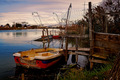 is the original image is the original image
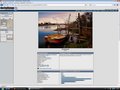
colors 32bit
resolution 1600x1200
frequency 60 Hz
full screen (without border) |
|
|
|
11/28/2008 01:14:27 PM · #4 |
| the horizontal pixels seems stretched! |
|
|
|
11/28/2008 01:39:27 PM · #5 |
I'm hard pressed to see any difference in the aspect ratio. I looked carefully at the small squares of the mesh fence and they seem the same as well. It may be that your screen capture grabbed what it was supposed to look like and I am still not seeing what you are.
It may be you still don't have your native resolution selected. Check your manual and look at the specs for the monitor. Make sure you are running it at it's native resolution. Anything other than that is likely to be the casue of the distortion you are seeing. |
|
|
|
11/28/2008 03:27:04 PM · #6 |
image dimensions (measured on the screen with a real rule!)
4:3 19x12.7 cm
16:10 21.7x12.7 cm
absurd!!!!!!!! |
|
|
|
11/28/2008 03:35:35 PM · #7 |
| What is the make/model of your monitor? |
|
|
|
11/28/2008 03:48:29 PM · #8 |
Originally posted by yospiff:
What is the make/model of your monitor? |
mcstyle natural vision 2201 |
|
|
|
11/28/2008 04:22:53 PM · #9 |
I found two of them listed online with specifications. A 19" model with a native pixel resolution of 1440*900, and a 22" model with a resolution of 1680*1050
The latter is what my 20" NEC monitor runs at.
Make sure you have the resolution set appropriately, but if it's already at that, I'm afraid I am out of ideas. |
|
|
|
11/28/2008 04:32:10 PM · #10 |
Originally posted by yospiff:
I found two of them listed online with specifications. A 19" model with a native pixel resolution of 1440*900, and a 22" model with a resolution of 1680*1050
The latter is what my 20" NEC monitor runs at.
Make sure you have the resolution set appropriately, but if it's already at that, I'm afraid I am out of ideas. |
I have the 22" model, when i set the resolution on 1680x1050 I obtain the message "out of range" :( |
|
|
|
11/28/2008 04:43:02 PM · #11 |
| That would indicate it is a higher resolution than your monitor can handle. Do you have a manual that gives the specs for your exact model? |
|
|
|
11/28/2008 05:02:02 PM · #12 |
| unfortunately I don't found the manual.... but on www.mcstyle.biz there is a textbox for contact the vendor. sended the mail, now I can only wait and hope that answer me :( |
|
|
|
11/28/2008 05:04:44 PM · #13 |
| I think the chances are good that your monitor is not running at the proper resolution and that is causing the stertching. |
|
|
|
11/28/2008 05:08:03 PM · #14 |
| yes probably this is the real reason. but why the maximum resolution don't work? I have a PC with windows vista and I think that is enough good for this monitor |
|
|
|
11/28/2008 05:41:21 PM · #15 |
Originally posted by Rino63:
yes probably this is the real reason. but why the maximum resolution don't work? I have a PC with windows vista and I think that is enough good for this monitor |
But can your graphic card actually drive the monitor at the resolution and colour range you're selecting? |
|
|
|
11/28/2008 05:50:23 PM · #16 |
Originally posted by JH:
Originally posted by Rino63:
yes probably this is the real reason. but why the maximum resolution don't work? I have a PC with windows vista and I think that is enough good for this monitor |
But can your graphic card actually drive the monitor at the resolution and colour range you're selecting? |
Yep! and are you running as VGA or DVI? With DVI the monitor and graphics card will set the monitor at its default setting for DVI.
Message edited by author 2008-11-28 17:50:47. |
|
|
|
11/28/2008 06:40:17 PM · #17 |
solved! right key of the mouse on desktop and choose the resolution 1680x1050. at this point the monitor don't work, well not maskerable hardware interupt(ehm... i.e. take away the power...). restart the pc(the monitor don't work) wait! choose start with windows in normal mode and MAGIC the monitor work to the maximum resolution!!!!! damn if capture that image I could win the blue next sunday :))))))) thank you to everyone :)))))))))
|
|
|
|
11/28/2008 06:42:45 PM · #18 |
Originally posted by Rino63:
solved! right key of the mouse on desktop and choose the resolution 1680x1050. at this point the monitor don't work, well not maskerable hardware interupt(ehm... i.e. take away the power...). restart the pc(the monitor don't work) wait! choose start with windows in normal mode and MAGIC the monitor work to the maximum resolution!!!!! damn if capture that image I could win the blue next sunday :))))))) thank you to everyone :))))))))) |
and good night, tomorrow I work :) |
|
Home -
Challenges -
Community -
League -
Photos -
Cameras -
Lenses -
Learn -
Help -
Terms of Use -
Privacy -
Top ^
DPChallenge, and website content and design, Copyright © 2001-2025 Challenging Technologies, LLC.
All digital photo copyrights belong to the photographers and may not be used without permission.
Current Server Time: 12/27/2025 10:13:18 AM EST.




