| Author | Thread |
|
|
11/10/2008 03:44:47 PM · #1 |
Does anyone know if zooming in on the live view image interpolates from a lower resolution (and not crops) the pixels in Nikon D90? I read in at least 2 reviews that stated this is the fact.
In my Canon 450D, it doesnt look like it interpolates when zooming in on the live view display. In fact I did a quick test focussing on a sharp mesh pattern (surround speaker front panel) and even at 10x in the live view, the pixels didnt look interpolated but actual crops.. the mesh can be seen in all its fineness even at that zoom.
Message edited by author 2008-11-10 15:45:56. |
|
|
|
11/10/2008 06:51:29 PM · #2 |
|
|
|
11/10/2008 06:52:01 PM · #3 |
| It's hard to work out, on my Olympus I can also do a full scale zoom on the live view, I can see people's faces in the shop right across the road, yet if I take a shot, on full crop, I can't see anywhere near that level of detail. |
|
|
|
11/10/2008 07:19:59 PM · #4 |
In Live View mode, all bets are off. There are an almost infinite number of ways that they may be processing data between the sensor and the screen. this must also be done very quickly to maintain a high frame rate, so demosaicing from RAW data will be very simple. I would not be surprised if they just take a 4-pixel average. You would not, in fact, lose much detail that way.
Bottom line, the zoomed live view image will certainly be at least a little worse than a full-resolution capture. Conversely, there is no conceivable way that a single frame of a live view image can be *better* than the same area of a full-resolution capture *except* that you are seeing video and your eyes/brain can potentially process the stream to give perceptually better results. This effect can be quite noticeable.
|
|
|
|
11/10/2008 07:29:28 PM · #5 |
Interesting.
I have actually tried to take a timed shot of stationary objects using a tripod, and the end image in full resolution is still not as sharp as the live view one cropped at 10x. Well one explanation could be that in actual image capture, we introduce other sources of error and noise.. while for live view, it is what it is.. within limitations of the LCD resolution and dynamic range.
I still wonder though about Nikon D90's live view.... people say that as you zoom in on a stationary scene during live view, the Nikon one is just doing a digital zoom (interpolation from a lower resolution image).. while my Canon seems to be showing actually what is projected on the corresponding sensor area.
Perhaps I have to go try it out and compare with my canon.
Message edited by author 2008-11-10 19:29:59. |
|
|
|
11/10/2008 08:15:35 PM · #6 |
Ok I just did some test with my Olympus.
I used my point and shoot to get these shots, sorry about the poor light.
This is the live view of my camera with the lens at full zoom.

This image below, is when I press some buttons on the live view, the purpose of this zooming in is to allow fine tuning when manually focussing using the live view.
As you can see, it says 7x, I'm pretty sure it goes to 10x but, you get the idea.

Hope this helps.
Message edited by author 2008-11-10 20:16:42. |
|
|
|
11/11/2008 01:09:37 AM · #7 |
| Thanks a lot for sharing that. I will try to share my cam's images too. |
|
|
|
11/11/2008 01:07:35 PM · #8 |
Ok so here it is:
This is a picture of liveview on the XSi with no zoom:
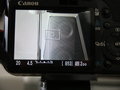
This is a picture of liveview on the XSi with 10x zoom:
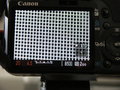
It really seems the 10x zoom is a full crop and then interpolated rather than an extrapolation from a lower resolution image.
Message edited by author 2008-11-11 13:08:07. |
|
|
|
11/11/2008 01:12:18 PM · #9 |
Calling alll D90 owners:::
It would be great if someone could share similar comparison images focussed on a mesh pattern (like the one I found on a speaker front panel). |
|
|
|
11/11/2008 03:46:31 PM · #10 |
From this source on Nikon D90 review,
"Manual Focusing in Live View Mode
With appropriate magnification, Live View displays can be very useful when manually focusing SLR cameras. During manual focusing, the Live View display on the Nikon D90 can be magnified quite considerably, but it seems it's not quite all that you might expect from the specifications. In Live View mode, pressing the magnifying glass button on the camera's back lets you zoom in up to a maximum of 6.7x. If you do the math, this would correspond to a 1:1 (pixel to pixel) ratio between the pixels of the camera's very high-resolution LCD and the sensor. The viewfinder image at this magnification isn't sharp, though; it seems the camera is actually grabbing fewer pixels than that section of the sensor actually contains and then interpolating them to form the image. (You can check this by snapping a shot and then magnifying the resulting image to the same degree in playback mode. Doing this, you'll find the image is quite a bit sharper than what you saw on the LCD in Live View mode.) While the magnified Live View display is still usable for focusing, it isn't as sharp as it could be, nor as sharp as the Live View display on some of Canon's SLR models sporting this feature."
|
|
|
|
11/11/2008 04:30:02 PM · #11 |
A few more from my Olympus.
It seems pretty sharp (my point and shoot doesn't do it justice) - but since I'm using four thirds the crop factor may have an effect.
//farm4.static.flickr.com/3151/3023325304_4183dde07b_o.jpg
//farm4.static.flickr.com/3209/3023326166_2e2875b840_o.jpg
//farm4.static.flickr.com/3169/3023325618_112cfdc394_o.jpg
Message edited by Manic - please keep images under 500px and 30kb, or post links or thumbs instead. |
|
|
|
11/13/2008 07:28:50 PM · #12 |
Thank you for sharing!
Message edited by Manic - please keep images under 500px and 30kb, or post links or thumbs instead. |
|
|
|
11/13/2008 07:29:03 PM · #13 |
| Bump for Nikon D90 users!! |
|
Home -
Challenges -
Community -
League -
Photos -
Cameras -
Lenses -
Learn -
Help -
Terms of Use -
Privacy -
Top ^
DPChallenge, and website content and design, Copyright © 2001-2025 Challenging Technologies, LLC.
All digital photo copyrights belong to the photographers and may not be used without permission.
Current Server Time: 12/27/2025 05:28:51 AM EST.




