| Author | Thread |
|
|
10/03/2008 08:21:42 PM · #1 |
Today it happened again.
While shooting full body-portraits, even when using a GOOD lens, tripod and flash, focussing on the eyes, the focus is lacking BIG time (on AF). It somehow seems like the cam can't focus on the eyes.
It's not the first time, unfortunately. It happens with both my Canon's (30D and 5D, in combination with my 85mm and 50mm), it happens with fellow students. At first I thought it was me, and I just didn't have the settings right. But today I made the circumstances all right (shutterspeed, aperture, tripod, flash, good lens), and it happened again.
Does anyone have the same issue on Canon camera's? Is it a regular issue from Canon? Is there a way to fix it??
It drives me CRAZY and is very very frustrating...
Message edited by author 2008-10-03 20:23:31.
|
|
|
|
10/03/2008 08:48:41 PM · #2 |
how are you focusing? Are you focusing on the eye with auto-focus and then recomposing? for critical focus, manual is still best.
The 50 and 85 can be pretty unforgiving when shooting at wide apertures. |
|
|
|
10/03/2008 09:09:03 PM · #3 |
I've been using the Canon 5D for several years now and haven't complained about the auto focus-ability of the camera.
Take a look at the last seven images in this gallery. These are hand held indoor light (ISO 800 f/1.8) shots using the Canon 5D mated to the Canon 85mm f/1.2L lens.
All of these were shot using Auto Focus (center point) using focus-recompose (something the experts say you can't do with the 85/1.2L lens). I admit the first of the 7 image isn't as sharply focused as it should have been. But I was much closer on that first image which meant that my DOF was so shallow as to be almost non-existent. The rest of the images are tack sharp, even if difficult to see at this sizes.
|
|
|
|
10/03/2008 09:38:19 PM · #4 |
| Ever since I started using the custom function for selecting the focus region (CF13), my focus has been great since it is easy to select the exact area I want in focus. |
|
|
|
10/03/2008 10:17:30 PM · #5 |
Originally posted by dwterry:
I've been using the Canon 5D for several years now and haven't complained about the auto focus-ability of the camera.
Take a look at the last seven images in this gallery. These are hand held indoor light (ISO 800 f/1.8) shots using the Canon 5D mated to the Canon 85mm f/1.2L lens.
All of these were shot using Auto Focus (center point) using focus-recompose (something the experts say you can't do with the 85/1.2L lens). I admit the first of the 7 image isn't as sharply focused as it should have been. But I was much closer on that first image which meant that my DOF was so shallow as to be almost non-existent. The rest of the images are tack sharp, even if difficult to see at this sizes. |
Those are great. Very pretty model too, I'm assuming she's a model and not a real bride :) |
|
|
|
10/03/2008 11:08:02 PM · #6 |
Originally posted by dmadden:
Those are great. Very pretty model too, I'm assuming she's a model and not a real bride :) |
lol ... I keep asking her to model for me. She's a real bride. She's from Brazil. They make 'em pretty there! :)
|
|
|
|
10/03/2008 11:57:20 PM · #7 |
Originally posted by dwterry:
Originally posted by dmadden:
Those are great. Very pretty model too, I'm assuming she's a model and not a real bride :) |
lol ... I keep asking her to model for me. She's a real bride. She's from Brazil. They make 'em pretty there! :) |
Brazil! your right about that.
VEWY VEWY PWETTY :) |
|
|
|
10/04/2008 05:36:12 AM · #8 |
@ Scarbrd: I tested the shots yesterday focussing without recomposing. I immediately took the shot after the focus-beep. Still unsharp. That was on a tripod, with all different apertures, with and without flash, etc. Here's the result (100% crop, no adjustments)
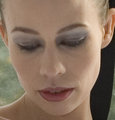
@ dwterry: with portraits I have no problems, that goes perfect. But full body portraits are a PITA.
@ Jeger: CF13? What is that?
|
|
|
|
10/04/2008 06:52:57 AM · #9 |
| Read the manual about CF13 etc. You can set custom functions and also adjust which focus point you wish to apply in each shot - adjustable. I have a 5D for a long while. I don't have these problems. I find the 5D (like any camera?) does not focus so well in poor light or on a subject's facial details when shot against the light, for example. I use both manual and auto focus. You might want to buy a focusing screen like the Ee-s. That way you can see the details pop in and out of focus accurately. |
|
|
|
10/04/2008 07:13:47 AM · #10 |
| hmm, have you checked your iso and noise reduction settings? I know those can remove detail and make an image appear blurred. sorry if this is unhelpful |
|
|
|
10/04/2008 07:39:58 AM · #11 |
| I've had the same problems, but have always assumed that it was me. I had a shoot two weeks ago - right lens (70-200), tripod, plenty of light, low ISO, fast shutter, customer stayed dead still, and yet I get a fuzziness that I hate. |
|
|
|
10/04/2008 07:58:01 AM · #12 |
Originally posted by biteme:
@ Jeger: CF13? What is that? |
CF13, or Custom Function 13, is one of the many customizable functions for your camera.
In the Menu of your camera, go to Custum Functions (C.Fn). Scroll to #13 and change it from 0 to 1:Multi-Controller direct. Exit the menu.
Now, when you are shooting, you can use your thumb to press the Multi controller to select the region you want the camera to focus on.
You can find more details about this in your 5D manual.
I'm not saying this will solve your problem indefinitely, but it will allow your camera to focus on the exact region you want, very easily. I agree also that my photos are not always as sharp as I would like them to be. |
|
|
|
10/04/2008 09:11:11 AM · #13 |
Originally posted by biteme:
Here's the result (100% crop, no adjustments)
|
Any chance of posting a full size uncropped / unedited version of this somewhere?
|
|
|
|
10/04/2008 09:18:39 AM · #14 |
| Have you tried to manually focus on a subject? Does your camera have a auto focus mode where you can adjust the focus manually after the camera focuses? I would like to see a full size manually focused shot if possible. |
|
|
|
10/04/2008 09:21:35 AM · #15 |
Originally posted by dwterry:
Originally posted by biteme:
Here's the result (100% crop, no adjustments)
|
Any chance of posting a full size uncropped / unedited version of this somewhere? |
I'll send you a pm
@ Pineapple: I'll check on that matte glass, who knows it works better! But I do feel it's not my sight or my skills, but the camera that is lacking.
@ togtog: I tried all kinds of settings. Even when using a higher ISO or even when the light is not very good, the cam should focus accurate, especially when you KNOW you focussed at the right spot.
@ Bebe: I'm glad I'm not alone on this ;)
@ Jeger: Thanks! I'll look in to it!
The bugging thing is that it happens in all kinds of light settings: studio, outside, indoors, etc...
Message edited by author 2008-10-04 09:23:19.
|
|
|
|
10/04/2008 09:29:50 AM · #16 |
Originally posted by Jac:
Have you tried to manually focus on a subject? Does your camera have a auto focus mode where you can adjust the focus manually after the camera focuses? I would like to see a full size manually focused shot if possible. |
I haven't tried to focus manually because through the viewfinder I find it hard to do. I can switch to manual after AF, but what's the point in that?
I just wanna shoot photo's, don't want to worry about sharpness anymore.. grrrr!
|
|
|
|
10/04/2008 10:01:29 AM · #17 |
Looking at the full size image, it appears to me that the her dress is better focused than her face. In fact, even the "goose bumps" on her legs appear to be more in focus than her face. So I'm thinking the lens either missed the desired focus point, or you or she moved after focus was locked (a real possibility when playing with shallow DOF).
The EXIF data on it says you're using the 50mm 1.8 II lens for this shot.
I can't find the discussion right now (tried several google searches), but I vaguely remember a discussion of focusing problems with the 50/1.8 II when focusing on distant subjects. I think that may apply here as you're having to stand back far enough to get a "full body" shot with this lens. Plus, you had mentioned that portraits (which I assume mean headshots) are okay. So it sounds like that may be what you are running into.
What I heard is that some lenses will be fine at certain distances, but at other distances the lens will tend to front focus or back focus. And when you're playing with shallow DOF that will cause it to miss the desired focus point.
One thing you might want to do is rent the 50/1.2L or the 50/1.4 lens and try it in the same conditions as the 50/1.8 (i.e. take a few shots with one, switch lenses and take the same shots with the other) and compare output. It could very well be the build quality of the lens that is tripping you up here.
|
|
|
|
10/04/2008 10:26:54 AM · #18 |
Thanks for your input here David, that really helps. I tried this setting with the 85 mm too (to see what happens). It should be the aperture indeed, I hope so anyway!
I've been working very hard the past couple of months, so I have some money to spend (yay!) I've been thinking about buying the Canon EF 24-70mm F/2.8 L USM to replace my Tamron lens (that one is great in the studio (head shots, right!) but is way way way too soft outdoors..
Do you know if the Canon lens has these issues too at certain distances?
|
|
|
|
10/04/2008 11:15:53 AM · #19 |
Originally posted by biteme:
Thanks for your input here David, that really helps. I tried this setting with the 85 mm too (to see what happens). It should be the aperture indeed, I hope so anyway!
I've been working very hard the past couple of months, so I have some money to spend (yay!) I've been thinking about buying the Canon EF 24-70mm F/2.8 L USM to replace my Tamron lens (that one is great in the studio (head shots, right!) but is way way way too soft outdoors..
Do you know if the Canon lens has these issues too at certain distances? |
Never had any focus problems with that lens (or any others to be honest). |
|
|
|
10/04/2008 07:12:22 PM · #20 |
| FYI, the Canon 24-70 is a great lens for sure and an all round money-maker, but you will find that it does come in soft sometimes of you are pixel peeping at 100%. It is pretty good at avoiding chromatic aberration, purple fringing. But there are times when I would like it to be sharper, especially in low light. I am using this lens with the 5D. |
|
|
|
10/04/2008 11:20:11 PM · #21 |
Any lens is a tad softer wide open that stopped down a bit. Canon's L's are fine for prints wide open. If you pixel peep you'll be unhappy so don't do it :D. Get a print and look at that instead- you'll be impressed.
The 24-70 2.8 is an impressive lens. I love it. Except when I need IS it's my main lens for everything. (17-55 2.8 IS is the IS lens I go to when I need IS). Studio, outdoors, receptions etc it's great.
This is the 24-70 2.8 at 2.8 
I never thought much of the 50 1.8 I had. Soft wide open, bad CA, slow to focus. I tested the 1.4 and 1.2 versions side by side and fell in love with the 1.2, at 1.2 specifically. MUCH nicer bokeh. It has a rep for issues with focusing at certain aperture/distance combinations but I've not had issues for what I use it for - mostly head or head / shoulder shots at aps under 2.8. I did try some 'scenics'type things when I first got it, shooting them at 1.2 and forget it - focus was uselessly bad.   is the 50 1.2 at 2.5 (both images). Sharp. is the 50 1.2 at 2.5 (both images). Sharp.
|
|
|
|
10/04/2008 11:29:53 PM · #22 |
Originally posted by Prof_Fate:
Any lens is a tad softer wide open that stopped down a bit. Canon's L's are fine for prints wide open. If you pixel peep you'll be unhappy so don't do it :D. Get a print and look at that instead- you'll be impressed. |
While I would normally agree 100% on that statement... the Canon 85/1.2L totally blew me away. Take a look at this image shot hand held at ISO 1000 f/1.2 (we were in the dim light of the modeling lights of my strobes):
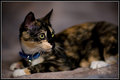
Now take a look at a 100% crop of this picture:
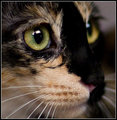
Note that I'm shooting f/1.2 ... and that I'm doing the focus-recompose thing that everyone tells me I'm not supposed to do. Still, the focus is absolutely dead-on on the eye, and you can see how shallow the DOF is by looking at the whiskers.
|
|
|
|
10/04/2008 11:38:26 PM · #23 |
the 85 1.2 is amazing. I find 85 a tad long for most things on a crop body, so I opted for the 50 1.2. I love this lens. I plan to get 5D2 and a 15 fisheye, maybe a 14 1.4...then I'll reconsider the 85 1.2. I hear the 135 F2 is to die for too.
I don't have any focus problems with 2.8 lenses. The 70-200 2.8 IS is softer wide open than stopped down, but it's very susceptible to flare and that's more an issue that any softness. And it's only soft if you compare it to say, an F8 shot.
I don't find the 24-70 soft wide open, but that's comparing it to the 70-200 or 17-55. I'm not a super stickler for sharp as I shoot wide open 90% of the time and so I see little else. Same for higher ISO noise - i'm pretty tolerant of it.
|
|
|
|
10/05/2008 12:05:19 AM · #24 |
Originally posted by dwterry:
Originally posted by Prof_Fate:
Any lens is a tad softer wide open that stopped down a bit. Canon's L's are fine for prints wide open. If you pixel peep you'll be unhappy so don't do it :D. Get a print and look at that instead- you'll be impressed. |
While I would normally agree 100% on that statement... the Canon 85/1.2L totally blew me away. Take a look at this image shot hand held at ISO 1000 f/1.2 (we were in the dim light of the modeling lights of my strobes):
Now take a look at a 100% crop of this picture:
Note that I'm shooting f/1.2 ... and that I'm doing the focus-recompose thing that everyone tells me I'm not supposed to do. Still, the focus is absolutely dead-on on the eye, and you can see how shallow the DOF is by looking at the whiskers. |
Woah. Pretty amazing. You know if Nikon has a similar lens?
I know, I don't belong in this thread :P |
|
|
|
10/11/2008 07:33:13 PM · #25 |
Well, yesterday I ordered the 24-70 and today it came in :D
Tuesday I'm gonna test some full bodies with it in the studio, so I'll keep you guys posted :)
Thanks for the replies here! |
|
Home -
Challenges -
Community -
League -
Photos -
Cameras -
Lenses -
Learn -
Help -
Terms of Use -
Privacy -
Top ^
DPChallenge, and website content and design, Copyright © 2001-2026 Challenging Technologies, LLC.
All digital photo copyrights belong to the photographers and may not be used without permission.
Current Server Time: 05/11/2026 05:21:16 PM EDT.




