| Author | Thread |
|
|
04/10/2008 10:43:17 AM · #1 |
On another site.... we'll just pretend I didnt say that....
A member asked for help with the lens flare on this photo... I tried masking, levels, curves... etc... with no real luck.
Does anyone here have any techniques to accomplish this?
Again.... not my photo.... with permission to edit....
Link to Photo
Any input would be appreciated!
Message edited by author 2008-04-10 10:57:08.
|
|
|
|
04/10/2008 10:59:10 AM · #2 |
[thumb]667729[/thumb]
quick edit: color balance, bad area masked and levels applied, the rest is manual work with dodging, burning, sponge tool, history brush. the building in the background needs more work of course |
|
|
|
04/10/2008 11:04:21 AM · #3 |
Yeah.... I dont think there is going to be an easy way... just labor intensive...
Thats about how I was going about it.... was hoping for a magic wand :D
|
|
|
|
04/10/2008 11:22:55 AM · #4 |
not sure it really makes a difference... but that looks more like the strap from a P&S that got in the way.
isn't there a tool in PS / LR that helps to correct lens flare? or is it only to add it (and not subtract)? |
|
|
|
04/10/2008 11:25:41 AM · #5 |
There is one to add it...
|
|
|
|
04/10/2008 11:55:35 AM · #6 |
Originally posted by rossbilly:
not sure it really makes a difference... but that looks more like the strap from a P&S that got in the way.
|
I thought so, too. |
|
|
|
04/10/2008 01:13:19 PM · #7 |
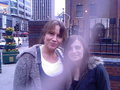 -- to --> -- to --> 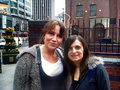
Kind of a booger here.
Initially was a match color, then duplicated the layer, blend mode in multiply and erased everything outside of the flare. While still active, make some tweaks to all sorts of stuff like color balance in midtones, midtone contrast, levels, etc. Final was hand-coloring & cloning of various parts of the pic like the brick wall, fence posts, etc.
Only having a 94K original didn't help either. |
|
|
|
04/10/2008 02:11:22 PM · #8 |
That is an amazing edit Brad! Do I hear "tutorial"?????
I'm going to go try that!!! You're the best!
|
|
Home -
Challenges -
Community -
League -
Photos -
Cameras -
Lenses -
Learn -
Help -
Terms of Use -
Privacy -
Top ^
DPChallenge, and website content and design, Copyright © 2001-2025 Challenging Technologies, LLC.
All digital photo copyrights belong to the photographers and may not be used without permission.
Current Server Time: 12/28/2025 01:10:30 PM EST.




