I have a Toshiba laptop with an ATI mobility Radeon HD2400 monitor (whatever that may mean..) and following the demise of my trusted Epson R320 printer I bought the newer model, Epson R360. Results have not been good; prints are uniformly too dark compared to the display image, with consequent loss of shadow detail, and an appearance of high contrast. My monitor isn't calibrated, but if I view the tone chart below images in voting I can see all the blocks. If I tilt my screen right back I get something approaching what I get when I print images, but on the tone chart I lose the last 4 boxes. I need to get the problem sorted in the next few weeks as I want to prepare some prints for competition.
Here are a couple of recent photographs that are printing horribly:
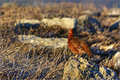
- here my displays shows the grouse as standing distinct from the background, subtley agreed, but nonetheless it can be clearly made out. In the print version the vertical wall of the las rock is completely blacked out, and the contrast on the rock in the foreground is very high with the highlights very bright and the shadows very dark.
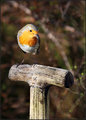
- Here I brightened the image slightly to try and compensate for the darker printer, but in the print the robin itself is so much brighter than the background it looks plain weird.
I am unsure whether it is my screen or printer that is the problem; I do intend to get a calibration tool this week - does anyone have anya dvice as to which would be the best to get. I move my laptop around a great deal, and I am a bit of a techno-idiot, so need something easy (and quick) to use. |




